

Description
ในที่สุด ระบบวิเคราะห์ WordPress ที่คุณจะใช้จริงๆ
Google Analytics นั้นเกินความจำเป็น ส่วนปลั๊กอินสถิติ WordPress อื่นๆ ส่วนใหญ่ก็รกและสับสน คุณแค่อยากติดตามผู้เข้าชมและรู้ว่าเกิดอะไรขึ้นบนเว็บไซต์ของคุณ โดยไม่ต้องมีความรู้ด้านวิทยาศาสตร์ข้อมูล
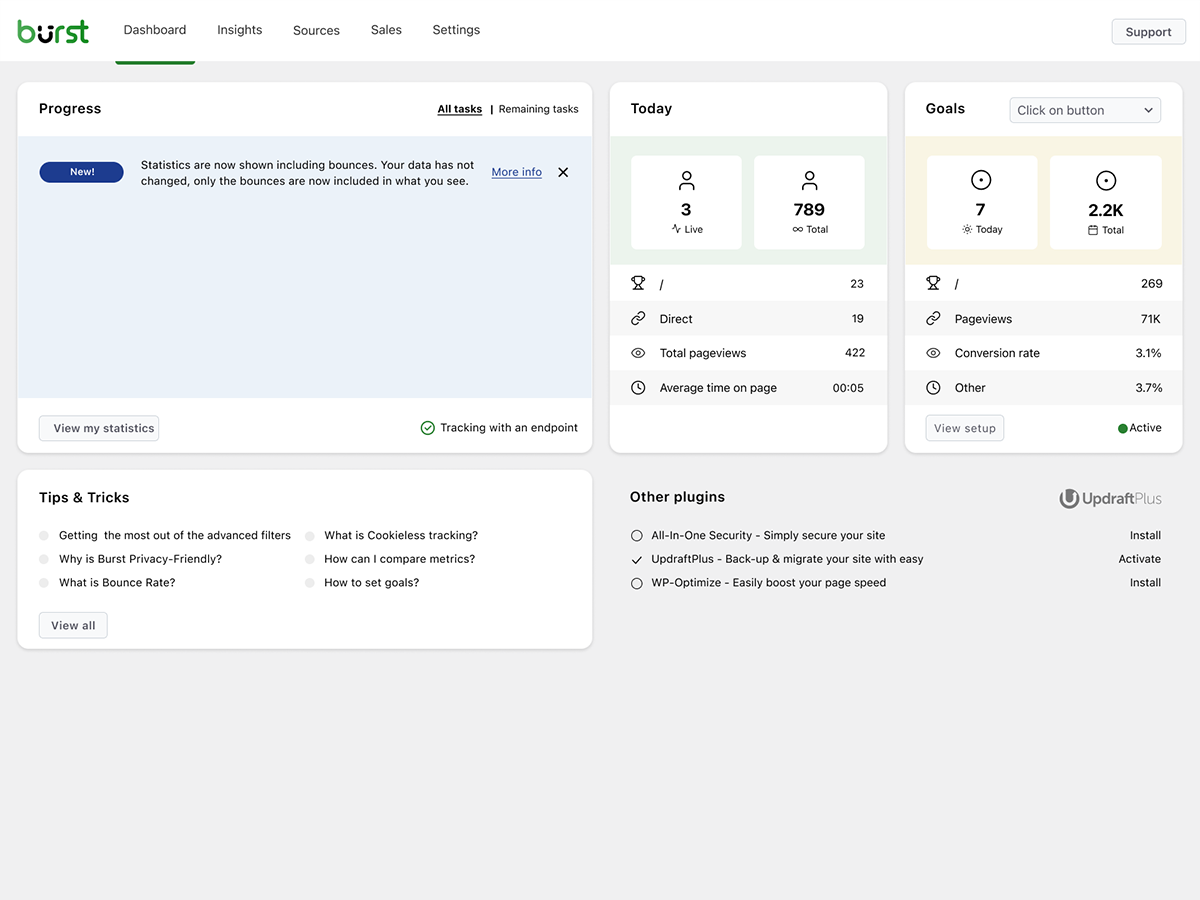
Burst Statistics มอบแดชบอร์ดวิเคราะห์ที่สะอาดและใช้งานง่าย โดยเน้นที่ตัวชี้วัดที่สำคัญจริงๆ ไม่ต้องมีบัญชีวิเคราะห์ภายนอก ไม่ต้องตั้งค่าซับซ้อน ติดตั้ง เปิดใช้งาน และเข้าใจการเข้าชมเว็บไซต์ของคุณได้ในไม่กี่วินาที
ได้รับความไว้วางใจจาก เว็บไซต์ WordPress กว่า 200,000 แห่ง สร้างโดยทีมเดียวกับ Team Updraft ที่รู้จักกันดีจาก UpdraftPlus, WP-Optimize และ All-In-One Security (AIOS)
ความคิดเห็นจากผู้ใช้ของเรา
“ในที่สุดก็ได้ปลั๊กอินวิเคราะห์ที่ฉันอธิบายให้ลูกค้าเข้าใจได้จริงๆ”
— @anguskeystone on wordpress.org“ฉันลอง WP Statistics และ Independent Analytics แล้ว แต่มันซับซ้อนและสับสนมาก UI ของ Burst ใช้งานง่ายและโฟกัสในสิ่งที่สำคัญสำหรับฉัน”
— @vallered on wordpress.org
ทำไมต้องเลือก Burst Statistics?
วิเคราะห์ที่ออกแบบมาให้นำไปใช้ได้จริง
ปลั๊กอินวิเคราะห์อื่นๆ โยนข้อมูลทุกอย่างใส่คุณ Burst แสดงเฉพาะสิ่งที่สำคัญ ทั้งผู้เยี่ยมชม pageview แหล่งอ้างอิง และหน้ายอดนิยม บนแดชบอร์ดที่คุณจะใช้จริงๆ ไม่มีข้อมูลท่วมท้น ไม่มีเมนูที่สับสน ดูว่าทำไม Burst เหมาะสำหรับบล็อกเกอร์
วิเคราะห์แบบให้ความสำคัญกับความเป็นส่วนตัวตั้งแต่ต้น
สถิติทั้งหมดของเว็บไซต์อยู่บนเซิร์ฟเวอร์ของคุณ ทำให้ Burst เป็นโซลูชันวิเคราะห์แบบ local อย่างแท้จริง ไม่มีการติดตามจากภายนอก ข้อมูลของคุณเป็นของคุณ เราจะไม่เห็นข้อมูลโดยไม่ได้รับอนุญาตจากคุณ ออกแบบมาให้รองรับ GDPR ได้ทันทีโดยไม่ต้องตั้งค่าเพิ่ม อ่าน ทำไม Burst Statistics ถึงเป็นมิตรกับความเป็นส่วนตัว
ตั้งค่าได้ทันที ไม่มีขั้นตอนยุ่งยาก
ติดตั้ง เปิดใช้งาน เสร็จเลย ไม่ต้องมีบัญชี Google Analytics ไม่ต้องตั้งค่า GA4 ไม่ต้องใส่โค้ดติดตาม ไม่ต้องปวดหัวกับการตั้งค่า เริ่มเห็นผู้เยี่ยมชมแบบ real-time ได้ทันที ใหม่กับการวิเคราะห์? เริ่มต้นด้วยคู่มือ WordPress analytics ของเรา
วิเคราะห์แบบ WordPress-native
ไม่ใช่การพอร์ตมาจากแพลตฟอร์มอื่น สร้างขึ้นมาเพื่อ WordPress โดยเฉพาะ ด้วยประสิทธิภาพ native และการผสานรวมที่ลื่นไหล รองรับ WooCommerce บล็อก เว็บไซต์ธุรกิจ และเว็บไซต์สมาชิก
วิเคราะห์แบบเบา เร็วตั้งแต่ต้น
query ฐานข้อมูลที่ปรับแต่งแล้ว สคริปต์ติดตามขนาดเล็กไม่ถึง 4 KB ไม่มี dependency ภายนอกที่ทำให้หน้าเว็บช้า ออกแบบมาให้ติดตามได้แม่นยำแม้ใช้การแคชฝั่งเซิร์ฟเวอร์แบบเข้มข้น ดูหลักฐานได้ที่ Burst ทำให้เว็บไซต์ช้าลงไหม
คุณสมบัติ
ทำความเข้าใจการเข้าชมเว็บไซต์ของคุณ
- ดูหน้าและโพสต์ที่มีผลงานดีที่สุดได้ในทันที
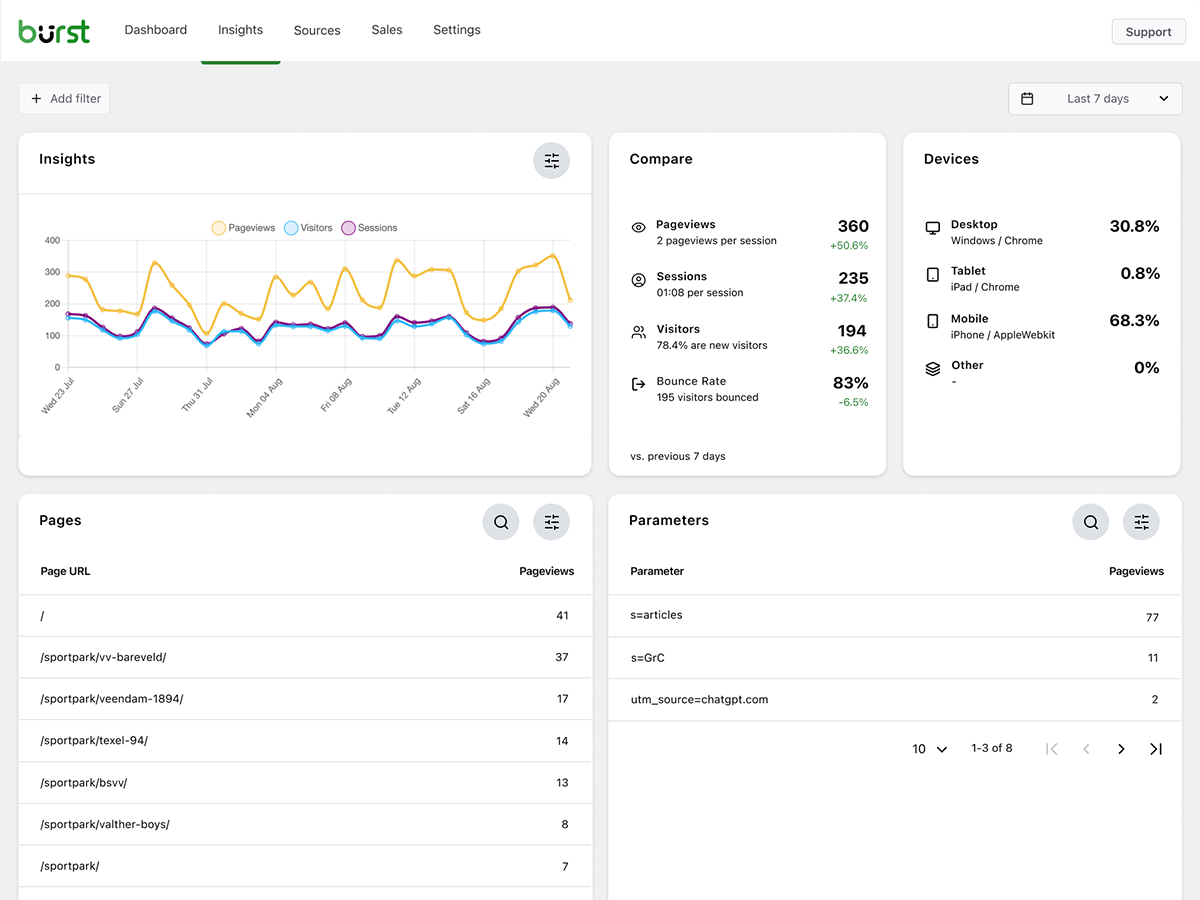
- ติดตามตัวชี้วัดหลัก: ผู้เข้าชม, session, pageview, bounce rate
- แยกประเภทผู้เข้าชมตามอุปกรณ์ (เดสก์ท็อป, แท็บเล็ต, มือถือ)
- กรองข้อมูลตามช่วงวันที่ที่กำหนดเอง
- เปรียบเทียบปริมาณการเข้าชมระหว่างช่วงเวลา
- การเชื่อมต่อกับ Search Console เพื่อดูการค้นหาบน Google ได้ตรงจากแดชบอร์ดของคุณ
วิเคราะห์แบบเรียลไทม์
- ระบุแหล่งที่มาของผู้เข้าชมแบบเรียลไทม์
- ดูหน้าเว็บที่ผู้ใช้กำลังเยี่ยมชมอยู่ในขณะนี้
- จำนวนผู้ใช้ที่กำลังออนไลน์อยู่บนเว็บไซต์ของคุณแบบเรียลไทม์
ดูว่าคอนเทนต์ไหนที่ทำงานได้ดี
- หน้าและโพสต์ยอดนิยมจัดอันดับตามจำนวนการเข้าชม
- เปรียบเทียบช่วงวันที่ใดก็ได้
- ติดตามประสิทธิภาพของแต่ละหน้าเว็บ
การติดตาม Conversion และเป้าหมายแบบกำหนดเอง
- ติดตามการดู การคลิก และ WordPress hook
- ติดตามข้อมูลวิเคราะห์และยอดขาย WooCommerce (Burst Pro Business)
- ติดตาม custom event และ Conversion
- ตั้งค่าทีละขั้นตอนด้วย คู่มือการตั้งเป้าหมาย ของเรา
วิเคราะห์แบบเป็นมิตรกับความเป็นส่วนตัว โดยไม่ต้องประนีประนอม
- self-hosted 100% ข้อมูลสถิติทั้งหมดเก็บไว้ในฐานข้อมูล WordPress ของคุณ
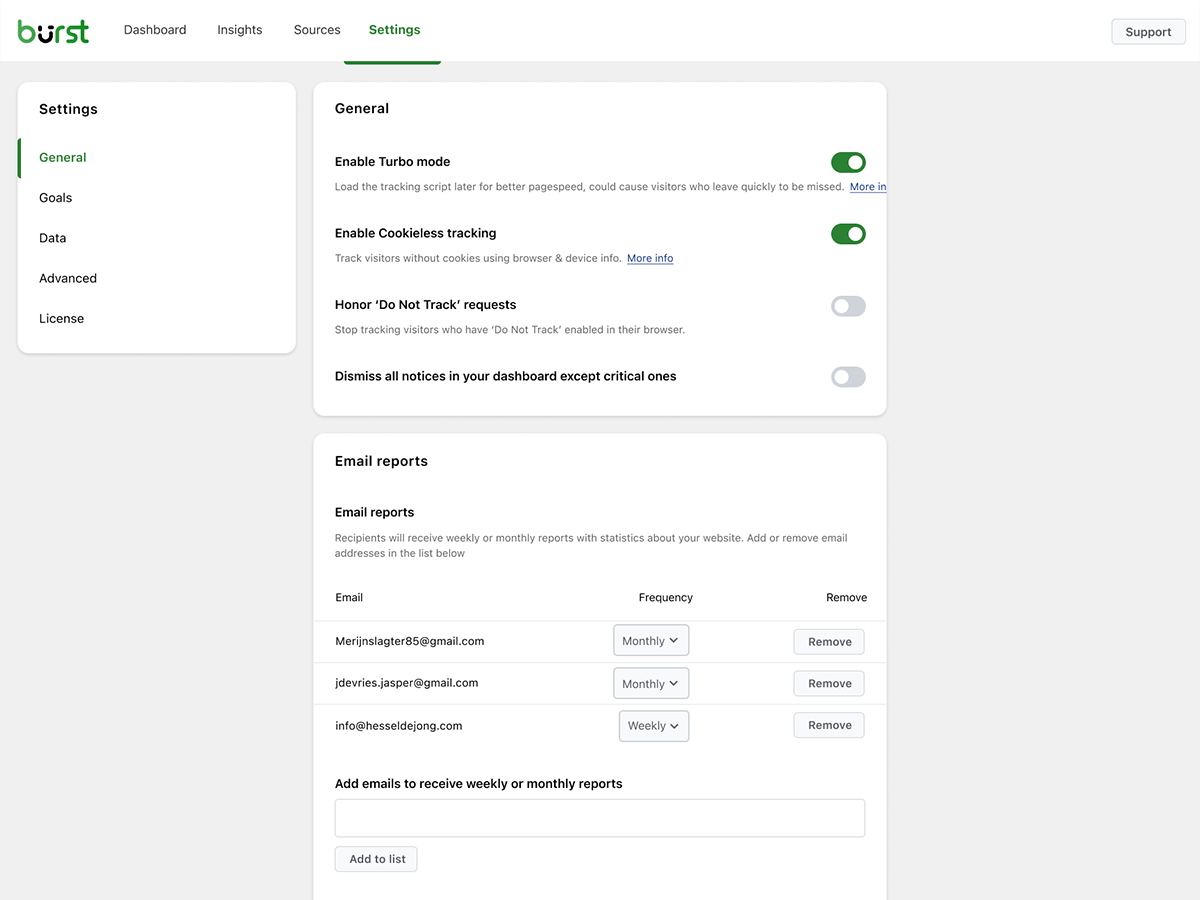
- การติดตามแบบไม่ใช้คุกกี้ ตัวเลือกการวิเคราะห์ที่ไม่ต้องใช้คุกกี้ และไม่ต้องแสดงแบนเนอร์ขอความยินยอมในหลายประเทศ
- ระบบวิเคราะห์ที่ออกแบบมาเพื่อรองรับการปฏิบัติตาม GDPR, CCPA, DSGVO, AVG, RGPD และ PECR
- ไม่มีการแชร์ข้อมูลกับ Google, Facebook หรือบุคคลที่สาม
อัปเดตข้อมูลให้ทันสมัยอยู่เสมอ
- รายงานอีเมลรายสัปดาห์หรือรายเดือนส่งตรงถึงกล่องจดหมายของคุณ
- เปรียบเทียบช่วงเวลาเพื่อดูแนวโน้ม
- รับการแจ้งเตือนเมื่อการติดตามไม่ทำงาน
ทางเลือกแทน Google Analytics ที่ออกแบบมาสำหรับ WordPress โดยเฉพาะ
ถ้าคุณโตเกินกว่า Google Analytics แล้ว หรือไม่เคยอยากใช้ GA4 ตั้งแต่แรก Burst ถูกสร้างมาเพื่อคุณ ในฐานะ ทางเลือกแทน Google Analytics Burst แลกความซับซ้อนของ GA4 มาเป็นความชัดเจน คุณจะได้ตัวชี้วัดที่สำคัญบนแดชบอร์ดเดียว โดยไม่มีการสุ่มตัวอย่าง ไม่มีการจำกัดข้อมูล และไม่ต้องส่งผู้เยี่ยมชมผ่านเครือข่ายโฆษณาของ Google
GA4 ถูกสร้างมาเพื่อทำให้ธุรกิจโฆษณาของ Google ดีขึ้น ส่วน Burst ถูกสร้างมาเพื่อทำให้เว็บไซต์ของคุณดีขึ้น
อยากเห็นภาพรวมทั้งหมดไหม? อ่าน ทำไมเจ้าของเว็บไซต์ WordPress ถึงเลิกใช้ Google Analytics หรือดูการเปรียบเทียบแบบตัวต่อตัว Burst Statistics vs Google Analytics
จากทีมผู้สร้าง UpdraftPlus, WP-Optimize และ All-In-One Security
Burst Statistics เป็นส่วนหนึ่งของ Team Updraft ทีมที่อยู่เบื้องหลังปลั๊กอิน WordPress ที่ได้รับความนิยมสูงสุดในตลาด:
- UpdraftPlus – WP backup and migration plugin
- WP-Optimize – แคช บีบอัดรูปภาพ minification และทำความสะอาดฐานข้อมูล
- All-In-One Security (AIOS) – ความปลอดภัยและไฟร์วอลล์
Burst Statistics เหมาะกับใคร?
Burst ใช้งานได้กับเว็บไซต์ WordPress ทุกประเภท แต่เราได้สร้างโซลูชันเฉพาะสำหรับสี่กลุ่มที่ได้ประโยชน์สูงสุด:
- บล็อกเกอร์และนักสร้างคอนเทนต์ ดูว่าโพสต์ใดโดนใจผู้ชมของคุณ
- ผู้ประกอบการและเจ้าของธุรกิจขนาดเล็ก เข้าใจการเข้าชมและแคมเปญของคุณโดยไม่ต้องซับซ้อน
- ร้านค้า WooCommerce ติดตามพฤติกรรมผู้เยี่ยมชม รายได้ และประสิทธิภาพสินค้า
- เอเจนซีและฟรีแลนซ์ จัดการการวิเคราะห์และรายงานสำหรับเว็บไซต์ลูกค้าหลายแห่ง
- เจ้าของเว็บไซต์ที่ใส่ใจความเป็นส่วนตัว ระบบวิเคราะห์ที่สอดคล้องกับ GDPR โดยไม่ต้องมีแบนเนอร์ขอความยินยอม
- ใครก็ตามที่เบื่อ Google Analytics รับความชัดเจนแทนความสับสน
ฟรี vs โปร
Burst Statistics (ฟรี) มีทุกอย่างที่คุณต้องการเพื่อทำความเข้าใจการเข้าชมเว็บไซต์ของคุณ ทั้งผู้เข้าชม, pageview, referrer, เนื้อหายอดนิยม, สถิติอุปกรณ์, การติดตามเป้าหมาย, รายงานทางอีเมล และอื่นๆ อีกมากมาย
Burst Pro เพิ่มฟีเจอร์ขั้นสูงสำหรับธุรกิจและมืออาชีพ เปรียบเทียบแผนทั้งหมดได้ที่หน้าราคา
แผน CREATOR
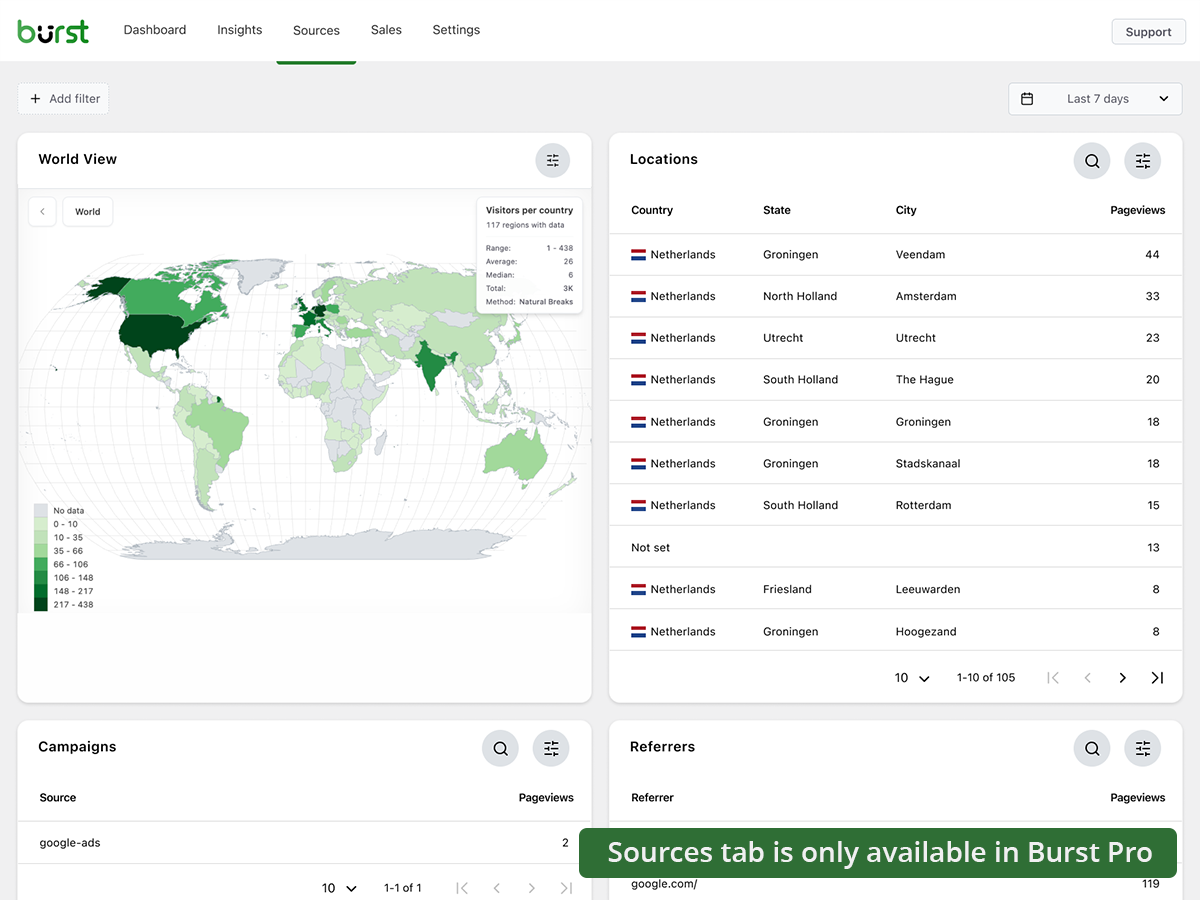
- การติดตามแคมเปญ UTM ดูว่าความพยายามทางการตลาดใดให้ผลลัพธ์
- ข้อมูลทางภูมิศาสตร์ ข้อมูลผู้เยี่ยมชมระดับประเทศและเมือง
- การกรองขั้นสูง แบ่งกลุ่มข้อมูลตามมิติใดก็ได้
- การตั้งค่าเก็บถาวรข้อมูล ทำให้ฐานข้อมูลของคุณเบาอยู่เสมอโดยอัตโนมัติ
- การสนับสนุนแบบ Priority ติดต่อตรงกับนักพัฒนาของเรา
แผน BUSINESS
- ทุกอย่างในแผน Creator บวกเพิ่มเติม
- แดชบอร์ดยอดขาย WooCommerce แบบเต็ม ดูว่าเนื้อหาใดสร้างรายได้มากที่สุด
- การระบุแหล่งที่มาของรายได้ เชื่อมยอดขาย WooCommerce กับแหล่งที่มาของการเข้าชม
แผน AGENCY
- ทุกอย่างในแผน Business บวกเพิ่มเติม
- รายงาน สร้างรายงานประสิทธิภาพที่แชร์ได้สำหรับลูกค้า
แผน Burst Pro ทุกแผนรวม การสนับสนุนแบบ priority ไว้ด้วย คุณจะได้ติดต่อโดยตรงกับนักพัฒนาของเรา ซึ่งเป็นคนจริงๆ ไม่ใช่แชทบอท
Burst เปรียบเทียบกับปลั๊กอินวิเคราะห์ WordPress อื่นๆ อย่างไร
เรามักถูกถามว่า Burst เทียบกับเครื่องมืออื่นๆ อย่างไร นี่คือคำตอบสั้นๆ ที่ตรงไปตรงมา:
- Google Analytics / GA4 GA4 มีประสิทธิภาพสูงแต่สร้างมาเพื่อนักโฆษณา ไม่ใช่เจ้าของเว็บไซต์ ซับซ้อน ใช้การสุ่มตัวอย่างและการจำกัดข้อมูล และต้องมีแบนเนอร์คุกกี้ในหลายประเทศ Burst คือทางเลือก GA4 ที่เรียบง่ายและเป็นมิตรกับความเป็นส่วนตัว แสดงตัวเลขจริงโดยไม่ต้องตั้งค่าซับซ้อน อ่าน การเปรียบเทียบแบบเต็ม
- MonsterInsights MonsterInsights เป็นตัวเชื่อมต่อที่ส่งข้อมูลของคุณไปยัง Google Analytics ถ้าต้องการทางเลือกแทน MonsterInsights ที่เก็บข้อมูลไว้บนเว็บไซต์ของคุณเองแทนที่จะส่งไปยัง Google Burst เหมาะกว่า
- Independent Analytics คู่แข่งที่น่านับถือซึ่งมีแนวทางคล้ายกันในด้านความเป็นส่วนตัวและ WordPress-native Burst เน้นหนักกว่าในด้านแดชบอร์ดที่นำไปใช้ได้จริง การติดตาม UTM และเป้าหมายที่ลึกกว่า วิเคราะห์รายได้ WooCommerce และรายงานระดับ Agency ลองทั้งคู่แล้วเลือกอันที่ถูกใจ
- Koko Analytics ตัวเลือกที่สะอาดและเบา เน้นฟีเจอร์พื้นฐาน Burst ไปได้ไกลกว่าด้วยการติดตามเป้าหมาย real-time analytics แคมเปญ UTM วิเคราะห์ WooCommerce และรายงานทางอีเมล
- WP Statistics ปลั๊กอินสถิติ WordPress ที่มีมานานและมีตัวเลือกมากมาย แต่ผู้ใช้หลายคนรู้สึกว่าอินเทอร์เฟซรกเกินไป Burst เน้นแดชบอร์ดเดียวที่ชัดเจน ออกแบบมาเพื่อความชัดเจนมากกว่าจำนวนฟีเจอร์
- Matomo โฮสต์เองได้และมีฟีเจอร์ครบ แต่หนักกว่าและซับซ้อนกว่าในการดูแล Burst คือตัวเลือกที่เรียบง่ายกว่า เร็วกว่า และเป็น WordPress-native อย่างแท้จริง
คู่มือและแหล่งข้อมูลที่มีประโยชน์
เรียนรู้ตัวชี้วัด แก้ปัญหาที่พบบ่อย และใช้ประโยชน์จากการวิเคราะห์ของคุณให้ได้มากขึ้น ทั้งหมดฟรี ทั้งหมดอยู่ที่ burst-statistics.com
เริ่มต้นใช้งาน
- WordPress analytics และตัวชี้วัดที่สำคัญจริงๆ
- วิธีติดตั้ง Burst Statistics จาก WordPress Repository
- วิธีตั้งค่าเป้าหมายแรกของคุณ
ความเป็นส่วนตัวและ GDPR
- ทำไม Burst Statistics ถึงเป็นมิตรกับความเป็นส่วนตัว
- วิธีตั้งค่าเว็บไซต์โดยไม่ต้องมีแบนเนอร์คุกกี้
- วิธีที่ Burst ติดตามผู้เยี่ยมชมเว็บไซต์โดยไม่ใช้คุกกี้
ตัวชี้วัดและการตีความข้อมูล
แคมเปญและ Conversion
- วิธีติดตามพารามิเตอร์ UTM (และ Burst)
- เครื่องมือสร้าง URL แคมเปญ
- วิธีสร้างและทดสอบ A/B แคมเปญการตลาดด้วย Burst
WooCommerce
- 10 วิธีที่พิสูจน์แล้วในการลดการละทิ้งตะกร้าสินค้าใน WooCommerce
- แนะนำการวิเคราะห์ยอดขายสำหรับ WooCommerce ใน Burst Pro
เรียกดู Learn hub แบบเต็มเพื่อดูเพิ่มเติม
การติดตั้ง
- ไปที่ Plugins Add New ใน WordPress dashboard ของคุณ
- ค้นหา Burst
- คลิก ติดตั้งตอนนี้ แล้ว เปิดใช้งาน
- ไปที่ Statistics Dashboard เพื่อดูข้อมูลวิเคราะห์ของคุณ
แค่นี้เอง ไม่ต้องสมัครบัญชีภายนอก ไม่ต้องวางโค้ดติดตาม Burst เริ่มเก็บสถิติเว็บไซต์ได้ทันที
ต้องการติดตั้งแบบ manual หรือผ่าน Composer ไหม? ดูได้ที่ การติดตั้ง Burst Statistics ด้วย Composer
บริการภายนอก
Burst ทำงานบนเซิร์ฟเวอร์ของคุณเองทั้งหมด และไม่ส่งข้อมูลของคุณไปที่ไหนเลย ฟีเจอร์เสริมสองอย่างด้านล่างนี้เป็นเพียงสิ่งเดียวที่ติดต่อกับบริการภายนอก และไม่มีอันไหนที่จำเป็นต้องใช้เพื่อให้ Burst ทำงาน กรุณาดู คำชี้แจงความเป็นส่วนตัว สำหรับนโยบายความเป็นส่วนตัวของเรา โดยแต่ละฟีเจอร์ด้านล่างจะมีลิงก์ไปยังนโยบายเฉพาะของตัวเอง
การเชื่อมต่อกับ Google Search Console (ไม่บังคับ)
เมื่อคุณเชื่อมต่อบัญชี Google ของคุณในหน้าตั้งค่าการเชื่อมต่อ Burst จะดึงข้อมูลประสิทธิภาพการค้นหาของคุณ (คำค้น คลิก การแสดงผล และอันดับ) จาก Google Search Console API (googleapis.com) มาแสดงในแดชบอร์ดของคุณ นี่เป็นการส่งข้อมูลทางเดียว: เว็บไซต์ของคุณดึงข้อมูลจาก Google และไม่มีข้อมูลผู้เข้าชมหรือข้อมูลสถิติใดถูกส่งไปยัง Google หรือมาที่เรา มีเพียงขั้นตอนยืนยันตัวตนแบบ OAuth และการรีเฟรชโทเค็นเท่านั้นที่วิ่งผ่านตัวส่งต่อของเราที่ search-console.burst-statistics.com ส่วนข้อมูลการค้นหาที่ดึงมาจะส่งตรงจาก Google ไปยังเว็บไซต์ของคุณเอง จะไม่มีอะไรเกิดขึ้นจนกว่าคุณจะเชื่อมต่อบัญชี และคุณสามารถยกเลิกการเชื่อมต่อได้ตลอดเวลา ซึ่งจะเป็นการเพิกถอนโทเค็นที่ Google อ่าน นโยบายความเป็นส่วนตัวสำหรับการเชื่อมต่อ Search Console ของเราได้ และดู นโยบายความเป็นส่วนตัวของ Google รวมถึง นโยบายข้อมูลผู้ใช้ของ Google API Services
การแชร์ข้อมูลแบบไม่ระบุตัวตน (ไม่บังคับ)
นี่เป็นกรณีเดียวที่ Burst จะส่งข้อมูลมาให้เรา และคุณต้องเลือกเปิดใช้งานเองเท่านั้น เมื่อคุณเลือกเปิดใช้งาน Burst จะส่งสถิติการใช้งานและประสิทธิภาพแบบรวมและไม่ระบุตัวตน (ไม่มีข้อมูลผู้เข้าชม ไม่มีข้อมูลส่วนบุคคล) ไปยัง api.burst-statistics.com เป็นระยะ ๆ สิ่งที่คุณจะได้กลับมาคือตัวเลขเปรียบเทียบประสิทธิภาพกับชุมชนในแดชบอร์ด ซึ่งเทียบเว็บไซต์ของคุณกับค่าเฉลี่ยของชุมชนแบบไม่ระบุตัวตน และช่วยให้เราพัฒนาปลั๊กอินให้ดีขึ้น อ่านเพิ่มเติมได้ที่ วิธีที่เราจัดการข้อมูลการใช้งานแบบไม่ระบุตัวตน
เครดิต
ข้อมูลตำแหน่งทางภูมิศาสตร์ระดับประเทศมาจากฐานข้อมูล MaxMind GeoLite2 ผลิตภัณฑ์นี้มีการใช้ข้อมูล GeoLite2 ที่สร้างโดย MaxMind ซึ่งดูได้ที่ https://www.maxmind.com/
Source code
The plugin ships the compiled analytics dashboard in includes/Admin/App/build/. The human-readable React/TypeScript source (includes/Admin/App/src/) and the build tooling are published on GitHub. Issues and pull requests are welcome there.
Screenshots
Blocks
This plugin provides 1 block.
- Pageviews Counter
FAQ
Burst Statistics ฟรีจริงๆ ไหม?
ได้เลย Burst Statistics ฟรี 100% โดยไม่มีข้อจำกัดด้านการติดตาม Burst Pro เป็นตัวเลือกเสริมสำหรับผู้ที่ต้องการฟีเจอร์ขั้นสูง เช่น การติดตาม UTM การระบุแหล่งที่มาของรายได้ ข้อมูลทางภูมิศาสตร์ หรือรายงานสำหรับลูกค้า นั่นคือวิธีที่เราทำให้ Burst Statistics ฟรีสำหรับผู้ใช้ส่วนใหญ่
ข้อมูลถูกเก็บไว้ที่ไหน?
สถิติทั้งหมดถูกเก็บไว้ในฐานข้อมูล WordPress ของคุณเอง ต่างจาก Google Analytics หรือเครื่องมือบนคลาวด์ เราไม่มีสิทธิ์เข้าถึงข้อมูลของคุณเลย ข้อมูลของคุณจะไม่ออกจากเซิร์ฟเวอร์ เว้นแต่คุณจะเลือกแชร์ข้อมูลการใช้งานแบบไม่ระบุตัวตนกับเราด้วยตัวเอง อ่านเพิ่มเติมเกี่ยวกับ วิธีที่ Burst จัดการข้อมูลของคุณ
Burst เป็นทางเลือกที่ดีสำหรับ Google Analytics ไหม?
ได้เลย ถ้าคุณรู้สึกว่า GA4 ซับซ้อนเกินไป หรือกังวลเรื่องการส่งข้อมูลผู้เยี่ยมชมไปยัง Google Burst คือตัวแทนที่สะอาดและเรียบง่าย คุณจะได้สถิติการเข้าชมเว็บไซต์ที่ต้องการจริงๆ ทั้งผู้เยี่ยมชม แหล่งอ้างอิง หน้ายอดนิยม และ Conversion โดยไม่รู้สึกท่วมท้น อ่าน คู่มือทางเลือกแทน Google Analytics เพื่อดูการเปรียบเทียบแบบเต็ม
Burst เป็นทางเลือกแทน GA4 ที่ดีไหม?
ได้เลย Burst ถูกสร้างขึ้นมาเป็นทางเลือก GA4 ที่เป็นมิตรกับความเป็นส่วนตัวสำหรับเจ้าของเว็บไซต์ที่ต้องการความชัดเจนแทนความซับซ้อน ไม่ต้องมีบัญชี Google ไม่ต้องใช้ tag manager และส่วนใหญ่ไม่ต้องมีแบนเนอร์คุกกี้ ดูเพิ่มเติมที่ ทำไมเจ้าของเว็บไซต์ WordPress ถึงเลิกใช้ Google Analytics
Burst เป็นทางเลือกแทน MonsterInsights ได้ไหม?
ได้เลย MonsterInsights เชื่อมต่อเว็บไซต์ WordPress ของคุณกับ Google Analytics ทำให้ข้อมูลยังคงไหลไปยัง Google ส่วน Burst เก็บทุกอย่างไว้บนเซิร์ฟเวอร์ของคุณเอง พร้อมแดชบอร์ดของตัวเองภายใน WordPress ถ้าต้องการวิเคราะห์ที่ไม่ต้องพึ่ง Google Burst คือทางเลือกแทน MonsterInsights ที่เรียบง่ายกว่า
Burst แตกต่างจาก WP Statistics, Independent Analytics หรือ Koko Analytics อย่างไร?
Burst เน้นความชัดเจนมากกว่าปริมาณฟีเจอร์ ในขณะที่ปลั๊กอินวิเคราะห์ WordPress อื่นๆ อาจรู้สึกรกและซับซ้อน แดชบอร์ดของ Burst ออกแบบมาเพื่อแสดงสิ่งที่สำคัญโดยไม่มีสิ่งรบกวน Independent Analytics มีแนวคิดใกล้เคียงที่สุด โดยมีแนวทางที่ให้ความสำคัญกับความเป็นส่วนตัวและเป็น WordPress-native เหมือนกัน Burst โดดเด่นด้วยการติดตาม UTM ที่ลึกกว่า วิเคราะห์ WooCommerce และรายงานระดับ Agency WP Statistics มีฟีเจอร์มากกว่า แต่ผู้ใช้หลายคนรู้สึกว่าซับซ้อนเกินไป ส่วน Koko Analytics เน้นความเรียบง่ายโดยตั้งใจ จึงเหมาะกับความต้องการพื้นฐานมากๆ
Burst แตกต่างจาก Matomo อย่างไร?
Matomo พยายามเป็นตัวแทนของ Google Analytics แบบเต็มรูปแบบ ส่วน Burst มุ่งเน้นเป็นเครื่องมือวิเคราะห์ WordPress ที่ชัดเจนและนำไปใช้ได้จริงที่สุด ถ้าต้องการความเรียบง่าย ตั้งค่าได้เร็ว และประสบการณ์ที่กลมกลืนกับ WordPress Burst เหมาะกว่า แต่ถ้าต้องการการตั้งค่าละเอียดและฟีเจอร์ครบแบบ GA Matomo อาจตอบโจทย์กว่า
ต้องมีบัญชีไหม?
ไม่ต้องเลย คุณไม่จำเป็นต้องมีบัญชี และไม่มีข้อมูลใดถูกส่งไปยังเว็บไซต์อื่น ถ้าคุณเชื่อมต่อ Google Search Console ทาง Burst จะดึงเฉพาะข้อมูลการค้นหาของคุณจาก Google เท่านั้น ไม่มีการส่งข้อมูลเกี่ยวกับผู้เข้าชมออกไปเลย ข้อยกเว้นเดียวคือการแชร์ข้อมูลแบบไม่ระบุตัวตน ซึ่งเป็นตัวเลือกที่คุณต้องเลือกเปิดเอง โดยจะแชร์สถิติแบบไม่ระบุตัวตนให้กับเรา และคุณจะได้ตัวเลขเปรียบเทียบประสิทธิภาพกับชุมชนกลับมาแทน
มีจำกัดจำนวนผู้เข้าชมที่ฉันสามารถติดตามได้ไหม?
ไม่มีเลย ข้อจำกัดเดียวคือฐานข้อมูลและเซิร์ฟเวอร์ของคุณเอง
มีตัวเลือกให้ใช้ การติดตามแบบไม่ใช้คุกกี้ หากต้องการ โดยค่าเริ่มต้น Burst ใช้คุกกี้เพราะแม่นยำกว่าและเบากว่า แม้จะใช้คุกกี้ Burst ก็ยังเป็นมิตรกับความเป็นส่วนตัว เพราะข้อมูลทั้งหมดเป็นแบบไม่ระบุตัวตนและเก็บไว้บนเซิร์ฟเวอร์ของคุณ อ่านเพิ่มเติมเกี่ยวกับ ทำไมคุกกี้ถึงถูกเข้าใจผิด
Burst Statistics สามารถใช้งานได้โดยไม่ต้องตั้งคุกกี้หรือเก็บข้อมูลในเบราว์เซอร์ ซึ่งอาจส่งผลต่อความแม่นยำเล็กน้อย จึงมีตัวเลือกแบบผสมที่ใช้คุกกี้หลังจากได้รับความยินยอมด้วย ดูเพิ่มเติมที่ วิธีที่ Burst ติดตามผู้เยี่ยมชมโดยไม่ใช้คุกกี้
Burst รองรับ GDPR ไหม?
Burst ออกแบบมาเพื่อรองรับการปฏิบัติตาม GDPR, CCPA, DSGVO, AVG, RGPD และ PECR ข้อมูลทั้งหมดอยู่บนเซิร์ฟเวอร์ของคุณ การติดตามเป็นแบบไม่ระบุตัวตน และสามารถปิดการใช้คุกกี้ได้ทั้งหมด สำหรับการตั้งค่าส่วนใหญ่ ไม่จำเป็นต้องมีแบนเนอร์ขอความยินยอมสำหรับการวิเคราะห์ ดูวิธีการได้ที่ วิธีตั้งค่าเว็บไซต์โดยไม่ต้องมีแบนเนอร์คุกกี้
ฉันสามารถใช้ Burst ควบคู่กับ Google Analytics ได้ไหม?
ได้เลย ผู้ใช้หลายคนใช้ทั้งสองควบคู่กันในช่วงเปลี่ยนผ่าน หรือเก็บ GA4 ไว้สำหรับข้อมูลย้อนหลังแล้วใช้ Burst สำหรับข้อมูลเชิงลึกรายวัน ไม่มีความขัดแย้งกันแต่อย่างใด
Burst Statistics ทำให้เว็บไซต์ของฉันช้าลงไหม?
ไม่เลย Burst ถูกออกแบบมาเพื่อประสิทธิภาพ ด้วย query ฐานข้อมูลที่ปรับแต่งแล้ว สคริปต์ติดตามขนาดเล็ก และ Turbo Mode สำหรับกรณีที่ความเร็วสำคัญกว่าความแม่นยำ อ่านรายละเอียดทั้งหมดได้ที่ Burst Statistics ทำให้เว็บไซต์ช้าลงไหม
Burst ใช้กับ WooCommerce ได้ไหม?
ได้เลย การติดตาม pageview พื้นฐานใช้งานได้ในเวอร์ชันฟรี แต่ถ้าต้องการวิเคราะห์ WooCommerce แบบเต็มรูปแบบ ติดตามรายได้ ประสิทธิภาพสินค้า และการระบุแหล่งที่มาของยอดขาย จะต้องใช้ Burst Pro Business
ฉันจะย้ายข้อมูลจากปลั๊กอินวิเคราะห์อื่นได้อย่างไร?
ติดตั้งและเปิดใช้งาน Burst แล้วระบบจะเริ่มติดตามข้อมูลทันที ข้อมูลย้อนหลังจากปลั๊กอินอื่นไม่สามารถนำเข้าได้ แต่คุณสามารถใช้ทั้งสองควบคู่กันในช่วงเปลี่ยนผ่านได้
สามารถติดตั้ง Burst Statistics ด้วย Composer ได้ไหม?
ได้เลย ทั้งปลั๊กอินฟรีและพรีเมียมสามารถจัดการผ่าน Composer ได้ อ่าน คู่มือการติดตั้งด้วย Composer เพื่อดูข้อมูลเพิ่มเติม
ฉันสามารถให้ข้อเสนอแนะเกี่ยวกับปลั๊กอินได้ไหม?
เรารับฟังความคิดเห็นของคุณเสมอ คุณสามารถ ส่งคำขอความช่วยเหลือในฟอรั่มของ WordPress แล้วเราจะตอบกลับอย่างรวดเร็ว
Reviews


Contributors & Developers
“Burst Statistics – วิเคราะห์ WordPress แบบง่าย (ทางเลือกแทน Google Analytics)” is open source software. The following people have contributed to this plugin.
Contributors


“Burst Statistics – วิเคราะห์ WordPress แบบง่าย (ทางเลือกแทน Google Analytics)” has been translated into 66 locales. Thank you to the translators for their contributions.
Interested in development?
Browse the code, check out the SVN repository, or subscribe to the development log by RSS.
Changelog
3.7.2
- September 29th 2026
- New: an AI summary block for email reports, which sums up the report period in a few sentences. The block is available when the AI assistant is enabled.
- New: the 404 pages block shows which pages link to a missing page, split into internal and external referrers, with a link to edit the internal page that holds the broken link.
- Improvement: informative dashboard tasks are shown one at a time, and after you dismiss one the next appears three days later. Warnings and errors are always shown.
- Improvement: the interactive tour fills the dashboard with sample data while it runs, instead of installing demo data in the database.
- Improvement: the page picker for goals loads faster on sites with a lot of statistics, and lists pages of every post type.
- Improvement: every dashboard task declares whether it applies inside the MainWP dashboard; tasks that assume the site’s own wp-admin are no longer served to MainWP.
- Improvement: the GoogleOther and Google-InspectionTool crawlers are recognized as bots and no longer tracked, props @draven666
- Fix: the MainWP dashboard offered every date range preset except “All time”; the presets are now localized from one list for the WP admin and the MainWP dashboard.
- Fix: the interactive tour is no longer offered inside the MainWP dashboard (task and settings button), where it cannot run.
- Fix: long messages in the report log batch details wrapped outside their row.
- Fix: since 3.7.1 the beacon hit was sent with fetch() instead of navigator.sendBeacon, so crawlers that render JavaScript, such as Google’s renderer, were counted as visitors. The hit is sent with sendBeacon again; fetch is only used when the beacon cannot be queued, or in debug mode, props @draven666
- Hardening: a user with share link access could extend access to the statistics after the share link expired by changing the password, props Chloe Chamberland / Wordfence.
3.7.1
- 17 กันยายน 2026
- ใหม่: การเชื่อมต่อกับ CartFlows โดยขั้นตอนการชำระเงินจะนับเป็นการเข้าชมหน้าชำระเงินในบล็อกทราฟฟิกแบบสด
- ใหม่: ทัวร์แบบอินเทอร์แอคทีฟ: การพาชมแบบมีไกด์ผ่านแดชบอร์ด, insights, ตารางข้อมูล, แหล่งที่มาของทราฟฟิก, ผู้ช่วย AI, การมีส่วนร่วมในการอ่าน, รายงาน, เป้าหมาย และการตั้งค่า โดยใช้ข้อมูลตัวอย่างเพื่อให้ทุกบล็อกมีข้อมูลครบ คุณสามารถหยุดทัวร์ชั่วคราวและกลับมาทำต่อจากจุดที่ค้างไว้ได้
- ปรับปรุง: ลายนิ้วมือแบบไม่ใช้คุกกี้ไม่สร้างภาพทดสอบ WebGL อีกต่อไป ซึ่งช่วยลดเวลา CPU ส่วนใหญ่ของสคริปต์ติดตามในการโต้ตอบครั้งแรก (สูงสุดราว ~190ms บนเดสก์ท็อป และมากกว่านั้นบนมือถือ) โดยไม่ทำให้ความเป็นเอกลักษณ์เสียไปอย่างมีนัยสำคัญ ผู้เข้าชมแบบไม่ใช้คุกกี้จะถูกนับเป็นผู้เข้าชมใหม่หนึ่งครั้งหลังการอัปเดต
- ปรับปรุง: ไอคอนผู้เข้าชมในบล็อก Live traffic ใช้สีที่แตกต่างกันสิบสองสีและมีการแฮชที่ดีขึ้น เพื่อให้แยกแยะผู้เข้าชมแต่ละคนได้ง่ายขึ้น
- ปรับปรุง: การเปิดหรือปิดใช้งานปลั๊กอินระหว่างคำขอ Burst REST ที่ผ่านการเพิ่มประสิทธิภาพแล้ว จะไม่สามารถบันทึกรายการปลั๊กอินที่ถูกลดจำนวนซึ่งตัวช่วยเพิ่มประสิทธิภาพ REST API ใช้กับคำขอนั้นได้อีกต่อไป ขอบคุณ Will Lassalle / JLSTech
- แก้ไข: บล็อก Compare เคยนับเซสชัน ผู้เข้าชม และการตีกลับสำหรับการเข้าชมที่ขอเฉพาะหน้าที่ไม่มีอยู่ (การเข้าถึงแบบ 404 ซึ่งมักเป็นการสแกนของบอท) ในขณะที่บล็อก Today และบล็อกอื่น ๆ ไม่นับรวมสิ่งเหล่านั้น ตอนนี้ทุกบล็อกใช้กฎเดียวกันแล้ว และเซสชันที่มีอยู่จะถูกอัปเดตด้วยการย้ายข้อมูลเบื้องหลัง
- แก้ไข: หน้าของประเภทโพสต์ที่ลงทะเบียนโดยปลั๊กอิน เช่น สินค้าของ WooCommerce แสดง url เป็นค่าว่างในตาราง Pages ตอนนี้ข้อมูลที่มีอยู่จะถูกเติมให้สมบูรณ์ด้วยการย้ายข้อมูลเบื้องหลัง
- แก้ไข: จำนวน “วันนี้” ในบล็อกเป้าหมายเริ่มต้นวันที่เที่ยงคืนตามเวลา UTC แทนที่จะเป็นเที่ยงคืนตามเขตเวลาของ WordPress
- แก้ไข: จำนวนผู้เข้าชมของช่วงวันที่ในอดีตแสดงเกือบเป็นศูนย์ในขณะที่การย้ายข้อมูลดัชนีผู้เข้าชมของเวอร์ชัน 3.7.0 ยังทำงานอยู่ ตอนนี้แถวที่ยังไม่ถูกแปลงจะถูกนับด้วยรหัสผู้เข้าชมแบบเดิมไปจนกว่าการย้ายข้อมูลจะเสร็จสมบูรณ์
- แก้ไข: การแจ้งเตือนความคืบหน้าของการอัปเกรดฐานข้อมูลเริ่มต้นที่เก้าสิบกว่าเปอร์เซ็นต์และแทบไม่ขยับ เพราะมันนับการอัปเกรดทุกครั้งที่เคยปล่อยมา แทนที่จะนับเฉพาะงานในชุดที่กำลังทำงานอยู่
- แก้ไข: คอลัมน์ Source ในตาราง Campaigns ไม่มีป้ายหัวคอลัมน์ และคำสั่งค้นหาแคมเปญในคอลัมน์นั้นไม่ถูกตัวกรองเป้าหมายรับรู้ว่าเป็นคำสั่งค้นหาแคมเปญ
- แก้ไข: มีการแจ้งเตือนว่าไม่พบตารางสำหรับตารางคำค้นหาที่ไม่ได้ใช้งานแล้ว
- แก้ไข: สคริปต์ติดตามไม่เริ่มทำงานเมื่ออีเวนต์การเปลี่ยนแปลงความยินยอมของแบนเนอร์คุกกี้ไม่มีหมวดสถิติรวมอยู่ ตอนนี้จะตรวจสอบ WP Consent API โดยตรงด้วย และคำขอ beacon จะใช้ fetch พร้อม keepalive ในกรณีที่รองรับ
- แก้ไข: ตัวช่วยเพิ่มประสิทธิภาพ REST API เคยอ่านและถอดรหัสเนื้อหาของคำขอหนึ่งครั้งต่อปลั๊กอินที่ใช้งานอยู่แต่ละตัว แทนที่จะเป็นหนึ่งครั้งต่อคำขอ ตอนนี้จะตรวจสอบเนื้อหาไม่เกิน 64 KB เท่านั้น ขอบคุณ Will Lassalle / JLSTech
For the full changelog, see burst-statistics.com/docs/changelog.