

Description
OZY Chat Assistant puts a smart AI assistant on your WordPress site. It automatically reads your pages, posts, products, and menus — then behaves as the dedicated AI agent for your business. Visitors get accurate, context-aware answers about your services without you lifting a finger.
Why OZY Chat Assistant is different
Most AI chat plugins require expensive SaaS subscriptions or are locked to one AI provider. OZY Chat Assistant:
- Learns your website automatically — scans your WordPress content and uses it to answer visitor questions accurately
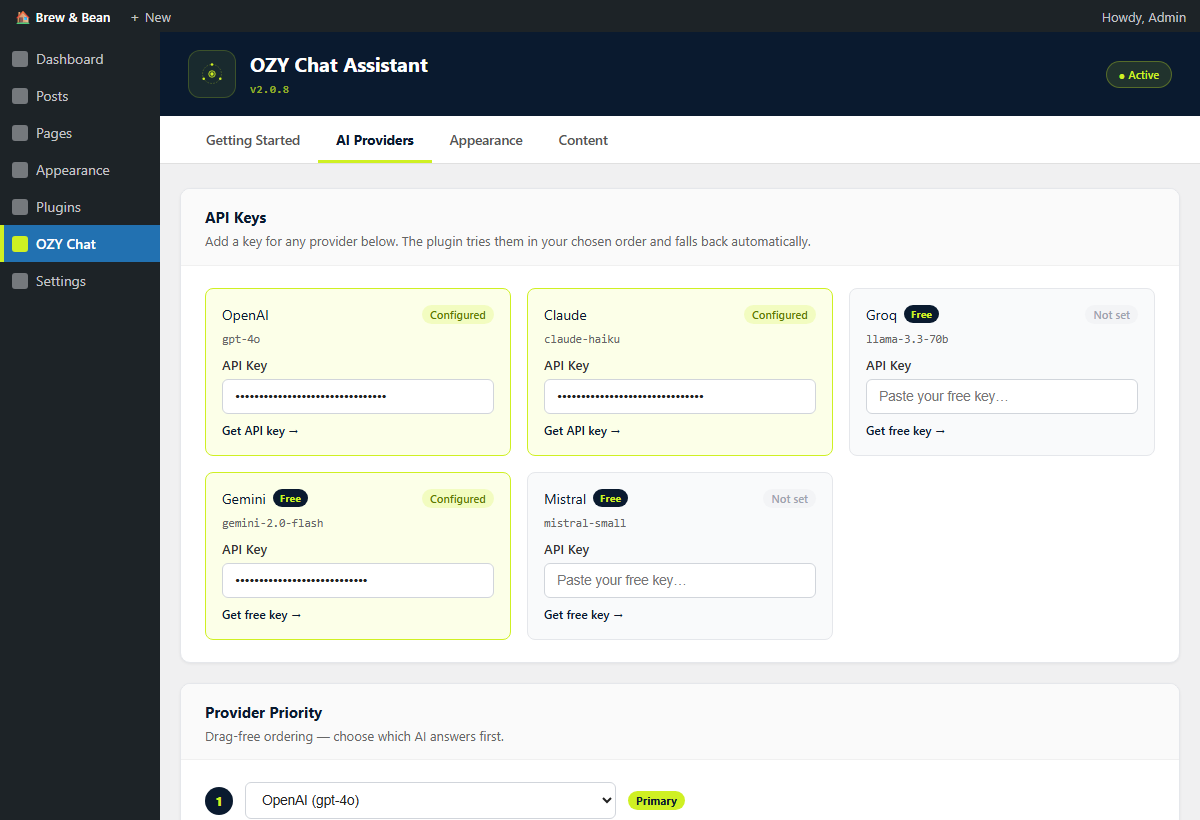
- Supports 5 AI providers — OpenAI, Claude, Groq, Gemini, Mistral — with configurable priority and automatic fallback
- Free tiers available — Groq, Gemini, and Mistral all offer free API keys
- Fully configurable dashboard — no code required, everything done from Settings
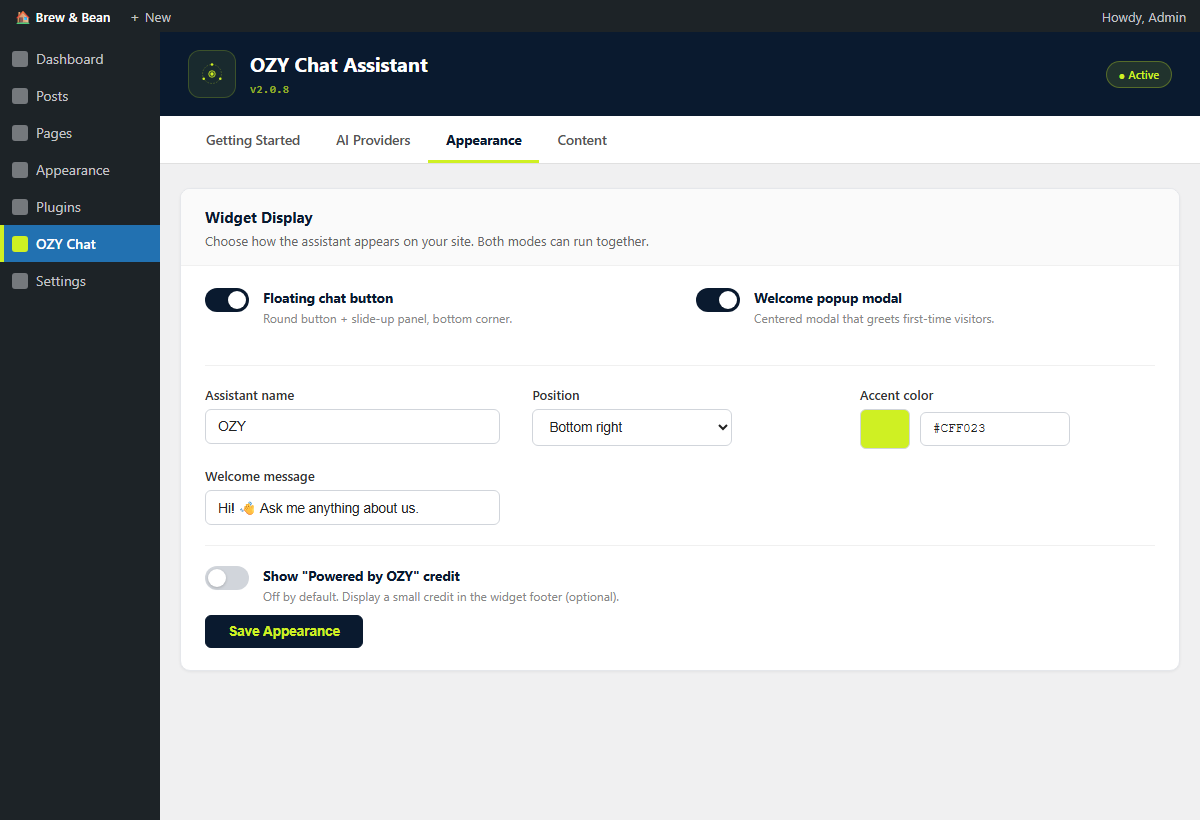
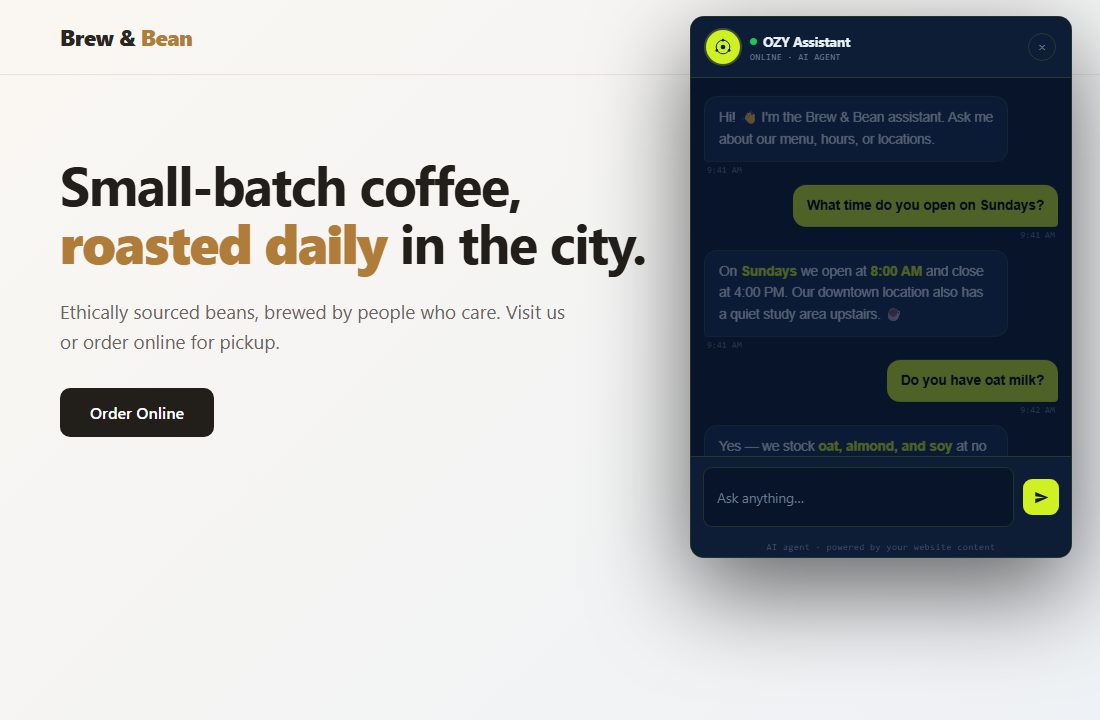
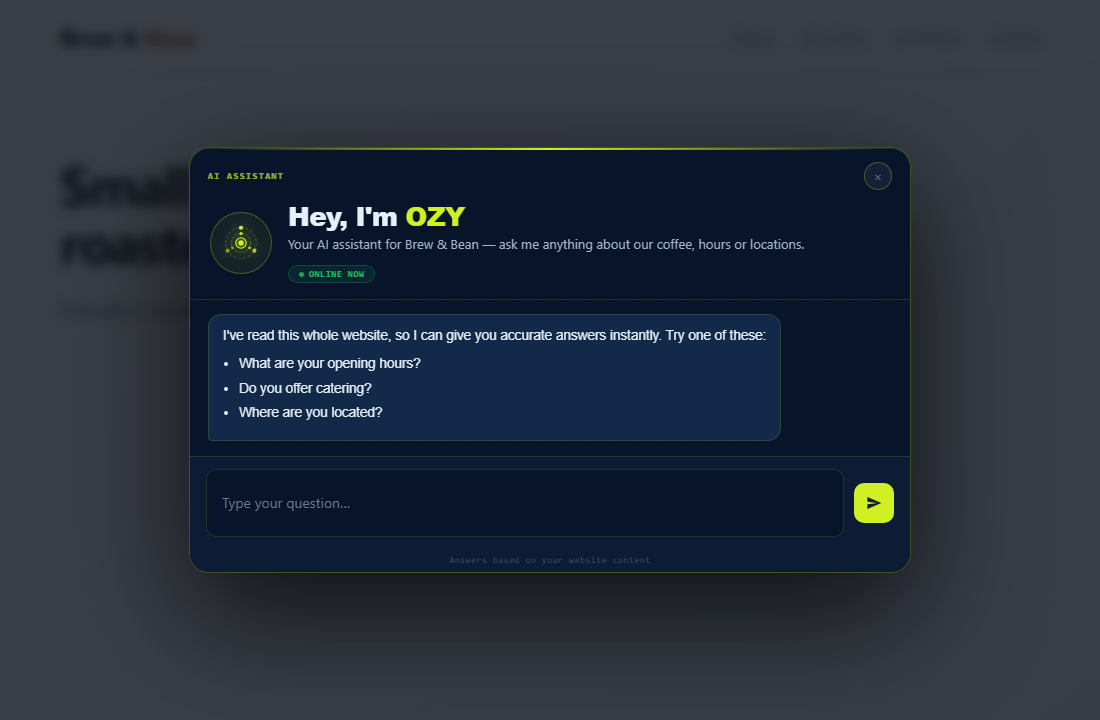
- Dual widget modes — floating button (side panel) + popup modal, each independently togglable
Core Features
- Multi-provider AI — OpenAI (GPT-4o), Claude (Haiku/Sonnet), Groq (Llama 3.3 70B), Gemini 2.0 Flash, Mistral Small
- Configurable priority — choose which provider is tried first and in what fallback order
- Website content reader — automatically reads your WordPress pages, posts, products, and menus
- Business knowledge base — add custom descriptions, services, FAQs, and policies
- Streaming responses — tokens appear in real time (like ChatGPT)
- Voice input — Groq Whisper STT transcribes voice messages
- Text-to-speech — AI reads responses aloud after voice input
- Floating button + panel — fixed corner chat button with slide-up panel
- Popup modal — centered overlay on first visit (independently togglable)
- Shortcode —
[oozzy_ai_agent]to embed on specific pages - IP/timezone-aware greeting — greets visitors based on their local time
- Re-engagement — prompts idle visitors after 50 seconds
- Chat history — persists last 30 messages across page loads
- Lightweight — no jQuery dependency, vanilla JS, minimal CSS
Setup in 5 Minutes
- Install and activate the plugin
- Go to Settings OZY Chat Assistant
- Add at least one API key in the AI Providers tab (Groq is free and recommended)
- Describe your business in the My Business tab and click “Scan My Website”
- Add contact details in the Agent tab
- Adjust appearance in the Appearance tab
Free API Keys
- Groq — https://console.groq.com (free, fast, recommended)
- Gemini — https://aistudio.google.com (free tier)
- Mistral — https://console.mistral.ai (free tier)
- OpenAI — https://platform.openai.com/api-keys (paid)
- Claude — https://console.anthropic.com (paid)
Shortcode
[oozzy_ai_agent]
Add to any page or post. Or enable “Load Site-Wide” in Appearance to load on every page without a shortcode.
External Services
This plugin connects to third-party AI services to generate chat responses. The plugin only contacts a provider if you have entered an API key for that provider in Settings OZY Chat Assistant AI Providers. No data is sent to any provider whose key is empty.
What is sent: the visitor’s chat message text, the prior conversation (up to the last 20 messages from the same browser session), and a system prompt containing your configured business info and a snapshot of public WordPress content (page/post titles and excerpts) you have configured the plugin to read.
When is it sent: every time a visitor submits a message in the chat widget on your site.
Providers used (only the ones with configured API keys are called):
- Groq — https://groq.com/ — terms: https://groq.com/terms-of-use/ — privacy: https://groq.com/privacy-policy/
- Google Gemini — https://ai.google.dev/ — terms: https://ai.google.dev/gemini-api/terms — privacy: https://policies.google.com/privacy
- Mistral AI — https://mistral.ai/ — terms: https://legal.mistral.ai/terms — privacy: https://legal.mistral.ai/terms/privacy-policy
- OpenAI — https://openai.com/ — terms: https://openai.com/policies/terms-of-use/ — privacy: https://openai.com/policies/privacy-policy/
- Anthropic (Claude) — https://www.anthropic.com/ — terms: https://www.anthropic.com/legal/consumer-terms — privacy: https://www.anthropic.com/legal/privacy
Voice transcription (only if the visitor uses the microphone button and a Groq API key is configured): the audio recording is sent directly to the Groq Whisper API endpoint (https://api.groq.com/openai/v1/audio/transcriptions) over an HTTP request. The audio is not stored on your WordPress server.
The plugin does not store visitor messages on your WordPress server. Chat history is kept only in the visitor’s own browser via localStorage and is cleared when the visitor clears their browser data.
Site owners are responsible for disclosing this third-party data processing to their visitors in their site’s privacy policy.
Screenshots
Installation
- Upload the
ozy-chat-assistantfolder to/wp-content/plugins/ - Activate the plugin through Plugins Installed Plugins
- Configure at Settings OZY Chat Assistant
FAQ
-
Do I need all five API keys?
-
No. You only need one working API key. The agent tries them in your configured priority order and falls back automatically if one fails. Groq is the recommended starting point — it’s free and fast.
-
Will it conflict with my theme or other plugins?
-
The widget uses fixed positioning and scoped CSS custom properties. It does not inject styles into the page flow. Conflicts are very rare.
-
Can I use it on a client’s website?
-
Yes. Each installation is independent. Configure the business info, agent name, and contact details for each site separately.
-
Streaming requires
ob_flush()/flush()support. This works on most hosts. If streaming fails, the widget automatically falls back to non-streaming mode. -
How does the website reader work?
-
The plugin reads your WordPress pages, posts, WooCommerce products, custom post types, and navigation menus using built-in WordPress functions — no external HTTP requests. The content is cached (default: 6 hours) and injected into the AI’s system prompt.
-
Who built this plugin?
-
Built and maintained by idanishrangaiz. See the plugin author link in your WordPress plugins page for support and contact details.
Reviews
There are no reviews for this plugin.
Contributors & Developers
“OZY Chat Assistant” is open source software. The following people have contributed to this plugin.
Contributors
Translate “OZY Chat Assistant” into your language.
Interested in development?
Browse the code, check out the SVN repository, or subscribe to the development log by RSS.
Changelog
2.0.8
- Fixed: the “Powered by OZY” credit no longer appears on the front-end chat widget by default. As required by the WordPress.org plugin guidelines, attribution on user-facing interfaces is now strictly opt-in.
- Added: a “Show ‘Powered by OZY’ Credit” toggle (off by default) in the Appearance tab. Site administrators must intentionally enable it for the credit to display.
2.0.7
- Changed: renamed the plugin to “OZY Chat Assistant” with the slug
ozy-chat-assistant; the text domain now matches the slug. - Changed: replaced all short
ozy/OZY_code prefixes with the uniqueoozzy/OOZZY_prefix on functions, classes, options, transients, nonces, AJAX actions, and the shortcode (now[oozzy_ai_agent]). - Changed: all upstream AI and voice requests now use the WordPress HTTP API (
wp_remote_post()) exclusively; removed all direct cURL calls. - Changed: voice transcription now uploads audio via a multipart HTTP request instead of writing a temporary file to disk.
- Removed:
load_plugin_textdomain()call — WordPress.org loads translations automatically since WP 4.6. - Fixed: corrected the Mistral terms/privacy URLs to the working Legal Center links.
2.0.5
- Fixed: replaced direct
<style>tag output withwp_add_inline_style()for the accent color CSS variables, as required by WordPress.org guidelines. - Fixed: updated Contributors field to correct WordPress.org username
idanishrangaiz. - Fixed: updated broken Mistral terms/privacy URLs in readme.txt.
2.0.4
- Fixed: replaced heredoc (<<<EOT) string syntax in the system-prompt builder with standard string concatenation, to satisfy the WordPress.org Plugin Check (PluginCheck.CodeAnalysis.Heredoc.NotAllowed).
- Fixed: bumped “Tested up to” header to 7.0 to match the current WordPress release (“Armstrong”).
- Fixed: added the missing
languages/directory (with aozy-chat-assistant.pottranslation template) so theDomain Path: /languagesheader in the plugin file now resolves to an existing folder.
2.0.3
- Removed: developer-promotion text that was injected into the AI system prompt. The AI no longer mentions the plugin author to your visitors.
- Removed: “Allow External Suggestions” setting (no longer needed). Setting default changed to off for any existing installs.
- Changed: chat widget footer simplified to “Powered by OZY” (brand only, no link, no full plugin name).
- Removed: developer bio and “Contact” CTA button from the admin Guide tab. Author info is available via the plugin page on WordPress.org instead.
- Removed: unused
standalone/folder (Vercel/Node.js demo code unrelated to the WordPress plugin). - Improved: added an “External Services” section to readme that fully discloses every third-party endpoint contacted and exactly what data is transmitted.
- Improved: added an inline reviewer-facing comment in
class-ozy-api.phpexplaining why cURL is used in the SSE streaming path (WP HTTP API does not support response streaming). - Improved: reduced readme tags to 5 (WP.org limit) and bumped “Tested up to” to 6.8.
2.0.2
- Fixed: popup modal background appeared transparent on some themes — CSS variables now resolve correctly for the modal.
- Fixed: voice (mic) button no longer shows an oversized dark hover background; hover now only changes the icon color.
- Improved: chat input field is taller and wider with better padding for easier typing on both desktop and mobile.
- Improved: voice mic button is more compact (28px), giving the text input more room.
- Improved: input row uses center alignment and tighter spacing for a more polished look.
- Fixed: admin settings tab links now point to the correct top-level admin URL (admin.php instead of options-general.php).
- Fixed: resolved leftover merge artifacts in CSS that were breaking widget styling in certain browsers.
2.0.1
- Fixed: saving settings on one tab (e.g. AI Providers) no longer resets toggles from other tabs (floating enable, popup enable, site-wide, auto-open).
- Added: auto-repair that restores visibility settings if all three are found to be off simultaneously.
- Improved: nonce verification now uses check_ajax_referer() for AJAX handlers.
- Improved: basic per-IP rate limiting (30 req/min for chat, 10 req/min for voice).
- Improved: MIME type validation and audio size check for voice transcription.
- Improved: removed all error-suppressor (@) operators; output buffering checked before flushing.
- Improved: user message bubble now renders in solid black bold text for better readability.
- Security: escHtml() now escapes double and single quotes to prevent attribute injection.
2.0.0
- Added OpenAI (GPT-4o Mini, GPT-4o, GPT-3.5 Turbo) support
- Added Claude (Haiku, Sonnet, Opus) support
- Added configurable provider priority order
- Added automatic website content reader (pages, posts, products, menus)
- Redesigned dashboard with aesthetic card-based UI
- Added dual widget modes: floating button and popup modal, each independently togglable
- Added business knowledge base field
- Added external suggestions toggle
- Added agent icon URL field
- Removed contact form auto-fill (now pure AI conversation agent)
- Streaming support for all providers
- Improved system prompt with site context injection
- Updated to GPL-2.0-or-later license
1.0.0
- Initial release