Description
Split Pay is the leading WordPress split payments plugin powered by Stripe Connect. Automatically split payments between your platform and one or more connected Stripe accounts — perfect for multi-vendor marketplaces, vendor payouts, commission management, and business partner revenue sharing.
Split Pay works with multiple e-commerce platforms including WooCommerce and FluentCart, with support for multiple Stripe payment gateways per platform. Whether you’re building a multi-vendor marketplace, managing supplier payments, running an affiliate storefront, or sharing revenue with business partners, Split Pay handles the entire payment splitting workflow so you can focus on growing your store.
How It Works
Split Pay uses the Stripe Connect Transfers API to automatically route a percentage or fixed amount of every sale to one or more connected Stripe accounts. It integrates with the Stripe payment gateway configured in your e-commerce platform — transfers appear in the Stripe Dashboard and are fully trackable from your WordPress admin.
Supported Platforms & Gateways
- WooCommerce with WooCommerce Stripe Payment Gateway (official)
- WooCommerce with Payment Plugins for Stripe WooCommerce
- FluentCart with FluentCart’s built-in Stripe integration
Each gateway is configured independently on the Integrations tab with its own platform secret keys, webhook syncing, and connected account management.
Who Is Split Pay For?
- Multi-vendor marketplace owners who need automatic vendor payouts
- Business partnerships where revenue is shared between parties
- Supplier and vendor relationships with automated commission payments
- Affiliate or referral storefronts that split sales with partners
- Service platforms that distribute payments to service providers
- Subscription businesses that share recurring revenue with vendors
Requirements
- At least one supported e-commerce plugin: WooCommerce or FluentCart
- A Stripe payment gateway plugin configured for your chosen platform
- Your Stripe platform secret key (entered in the Integrations tab per gateway)
- Minimum transfer amount of $1 per Stripe limitations
- Transfers between Stripe accounts in the same country/region (cross-border support coming soon)
🆓 Free Features
% PERCENTAGE-BASED SPLIT PAYMENTS
Transfer a percentage of every sale to a single connected Stripe account. Define a global split percentage and every payment is automatically divided — no manual payouts required. Works with WooCommerce and FluentCart.
💱 CURRENCY AGNOSTIC PAYMENTS
Accept payments in any currency supported by Stripe. Split payment calculations happen automatically regardless of your store currency — USD, EUR, GBP, AUD, CAD, and 100+ more.
🔧 INTEGRATIONS TAB WITH GUIDED SETUP
The Integrations tab auto-detects your installed e-commerce plugins and Stripe gateways. Configure platform secret keys, check webhook endpoints, and manage connected accounts per gateway — all from one place. Supports WooCommerce (two Stripe gateways) and FluentCart simultaneously.
⭐ PRO Features
🔀 SPLIT PAYMENTS ACROSS MULTIPLE VENDOR ACCOUNTS
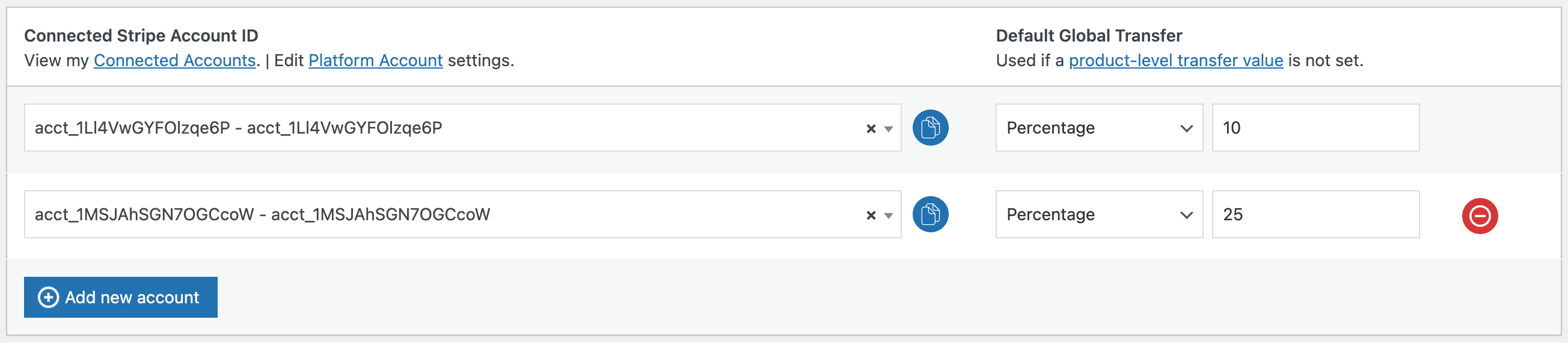
Split payments across multiple connected Stripe accounts simultaneously. Onboard unlimited vendors, suppliers, or service providers and configure individual transfer amounts for each connected account. Works with both WooCommerce and FluentCart orders.
🏢 VENDOR ONBOARDING & SELF-REGISTRATION
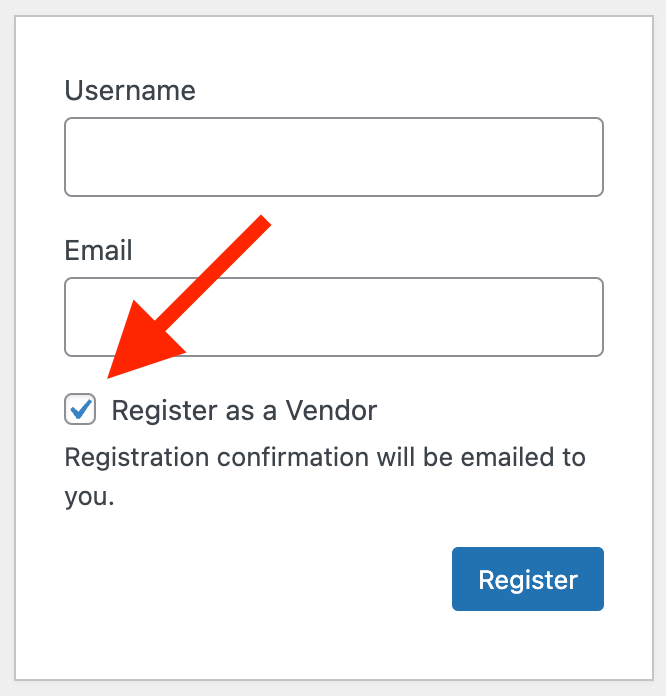
Invite vendors directly or let them self-register through a dedicated vendor registration page. Vendors connect their Stripe account to your platform with a single click — no technical configuration needed. Assign any WordPress user role as a vendor role for maximum flexibility.
🔍 PRODUCT-LEVEL COMMISSION RATES
Set transfer percentages globally or override them at the product level. For example, split all sales at 10% globally, but set Product A at 20% and Product B at 5%. Fine-grained commission control for every product in your catalog — available for both WooCommerce products and FluentCart products.
📊 GLOBAL & PRODUCT-LEVEL FIXED AMOUNT TRANSFERS
Configure fixed transfer amounts globally or per product. Transfer $5 from every sale, or set $10 for Product X and $25 for Product Y. Mix and match with percentage-based splits across your store.
🃏 COMBINE PERCENTAGES AND FIXED AMOUNTS
Use percentage-based commissions for some products and fixed-amount payouts for others — all in the same store. Transfer $10 from Product X sales and 25% from Product Y sales simultaneously.
🍒 VARIABLE PRODUCT SUPPORT
Full support for WooCommerce variable products. Set unique transfer values, transfer types, and connected accounts for each product variation. Percentages and fixed amounts can be combined across variations.
🔁 WOOCOMMERCE SUBSCRIPTIONS SUPPORT
Fully compatible with the official WooCommerce Subscriptions plugin. Every recurring subscription payment automatically triggers the same split payment transfer — so recurring revenue is shared with your connected vendors or partners on every billing cycle.
🚢 SHIPPING FEE TRANSFERS
Transfer a percentage or fixed amount of shipping fees to connected vendor accounts. Ideal for marketplaces where vendors handle their own product fulfillment and shipping.
💸 TAX TRANSFERS
Transfer 100% of collected taxes to connected vendor accounts, or transfer partial taxes proportionally based on product-level transfer values. Full control over how tax revenue is distributed.
💳 ALL STRIPE PAYMENT METHODS SUPPORTED
Works with every payment method available through your Stripe gateway — credit cards, debit cards, Apple Pay, Google Pay, SEPA, iDEAL, Bancontact, and more. Supports the official WooCommerce Stripe Payment Gateway, Payment Plugins for Stripe WooCommerce, and FluentCart Stripe. Deferred payment methods automatically wait for settlement before transferring.
↩️ AUTOMATIC REFUND HANDLING
When a refund is processed in WooCommerce, Split Pay automatically reverses the proportional transfer amounts to each connected vendor account. Supports both full and partial refunds with detailed order notes.
🔄 RETRY FAILED TRANSFERS
Encountered a failed transfer? Use the “Retry Transfers” order action to reprocess transfers directly from the order edit screen. No need to manually recreate transfers in Stripe.
📃 TRANSFER DASHBOARD & CSV EXPORT
The Transfers tab in your WordPress admin displays a complete history of all split payment transactions across all integrations. Filter by source (WooCommerce / FluentCart), search, paginate, and export to CSV for accounting, reporting, or reconciliation.
⏩ HIGH-PERFORMANCE ORDER STORAGE (HPOS) COMPATIBLE
Fully tested and compatible with WooCommerce High-Performance Order Storage. Rest assured that all your split payment transfers work reliably at scale with the latest WooCommerce architecture.
🕜 BULK EDITOR FOR PRODUCTS
Manage transfer settings for hundreds or thousands of products with a spreadsheet-style bulk editor. Supports both WooCommerce and FluentCart products with source identification. Filter by category, product name, SKU, or attributes — then update transfer values and connected accounts in bulk.
✉️ TRANSFER CONFIRMATION EMAILS
Automatically send transfer confirmation emails detailing every split payment amount, links to transfers in the Stripe Dashboard, and any failures that occurred. Keep stakeholders informed on every transaction.
🛡️ ROBUST SETUP VALIDATION
API key format validation, incomplete configuration warnings, high transfer percentage alerts (97%+), and connected account country mismatch detection. Catch configuration issues before they affect your payments.
🔌 DEVELOPER-FRIENDLY WITH HOOKS & FILTERS
Extensive WordPress filter hooks for customizing transfer behavior — modify transfer metadata, override connected accounts, adjust calculations, and integrate with custom workflows. Full documentation available for developers.
🌱 WEBSITE & PRICING
📕 DOCUMENTATION
💬 SUPPORT
Compatibility
- WooCommerce — Full integration with WooCommerce orders, products, and admin
- FluentCart — Full integration with FluentCart orders, products, and SPA admin
- WooCommerce Stripe Payment Gateway — Official Stripe gateway for WooCommerce
- Payment Plugins for Stripe WooCommerce — Alternative Stripe gateway for WooCommerce
- FluentCart Stripe — FluentCart’s built-in Stripe payment integration
- WooCommerce Subscriptions — Recurring split payments for subscription products
- WooCommerce HPOS — High-Performance Order Storage fully supported
- WooCommerce Bundles — Split payments work with bundled products
- Advanced Product Fields — Compatible with custom product field plugins
- WordPress Multisite — Supports multisite installations
Roadmap:
- Cross-border Stripe Connect transfer support (currently same country/region only).
GAUCHO PLUGINS PORTFOLIO
Payment Page: Start accepting payments in a beautiful payment form in less than 60 seconds
Split Pay Plugin: Split WooCommerce payments across multiple connected Stripe accounts.
Login for Stripe Customer Portal: Create an Account login area for your Stripe customers.
Gyta Buyback: Create a trade-in / buyback business using WooCommerce.
Version Info: Show WP, PHP, MySQL & Web Server Versions in the WP-Admin Dashboard.
China Payments Plugin: Accept WeChat Pay and Alipay payments from Chinese customers.
Blocked in China: Check if your website is available in the Chinese mainland.
Speed in China: Check your website’s speed in the Chinese mainland.
Screenshots


Installation
- Upload
bsd-split-pay-stripe-connect-woo.zipthrough the Plugins > Add New > Upload menu in WordPress. - Click Activate to enable the plugin.
- Navigate to Split Pay > Integrations to configure your gateway settings.
- For each detected Stripe gateway, enter your platform secret key (test and/or live) and click “Sync Connected Accounts.”
- Go to Split Pay > Global Transfer Settings to add connected accounts and set your global transfer percentage or fixed amount.
- Process a test payment to verify your split payment configuration.
- Check out our documentation for detailed setup guides and configuration options.
FAQ
-
What is Split Pay and how does it work?
-
Split Pay is a WordPress plugin that uses the Stripe Connect Transfers API to automatically split payments between your Stripe platform account and one or more connected Stripe accounts. It works with WooCommerce and FluentCart. When a customer makes a purchase, the payment is collected by your platform and a configured percentage or fixed amount is automatically transferred to the connected vendor account(s).
-
What plugins are required for Split Pay to work?
-
Split Pay requires at least one supported e-commerce plugin with a Stripe payment gateway. Supported combinations include: WooCommerce with the WooCommerce Stripe Payment Gateway, WooCommerce with Payment Plugins for Stripe WooCommerce, or FluentCart with its built-in Stripe integration. You can run multiple platforms and gateways simultaneously.
-
Can I use Split Pay to build a multi-vendor marketplace?
-
Yes! Split Pay is designed to power multi-vendor marketplaces on WooCommerce or FluentCart. With the Pro version, you can onboard multiple vendors, allow them to self-register and connect their Stripe accounts, set product-level commissions, and automatically split every payment across vendor accounts.
-
What payment methods are supported for split payments?
-
Split Pay supports every payment method available through your Stripe gateway, including credit cards, debit cards, Apple Pay, Google Pay, SEPA Direct Debit, iDEAL, Bancontact, and more. It works with the official WooCommerce Stripe Payment Gateway, Payment Plugins for Stripe WooCommerce, and FluentCart Stripe. Deferred payment methods automatically wait for settlement before the transfer is processed.
-
Does Split Pay work with WooCommerce Subscriptions?
-
Yes, Split Pay is fully compatible with the official WooCommerce Subscriptions plugin. When a subscription renewal payment is processed, the same split payment transfer is automatically triggered — so recurring revenue is shared with your connected vendors or partners on every billing cycle.
-
Can I set different commission rates for different products?
-
Absolutely. With Split Pay Pro, you can set transfer percentages or fixed amounts globally and then override them at the product level. You can even set different transfer values for each variation of a variable product. Mix percentage-based and fixed-amount commissions across your entire product catalog.
-
How do vendors connect their Stripe account to my WooCommerce store?
-
Vendors can self-register through a dedicated vendor registration page or be invited by the store admin. Once registered, vendors see a “Connect with Stripe” button on their dashboard page. Clicking it initiates the Stripe Connect onboarding flow — no technical setup required from the vendor. You can assign any WordPress user role as a vendor role.
-
Does Split Pay handle refunds automatically?
-
Yes. When you process a full or partial refund in WooCommerce, Split Pay Pro automatically calculates the proportional transfer amount and reverses it from each connected vendor account. Detailed notes about the reversal are added to the order for a complete audit trail.
-
What happens if a transfer fails?
-
If a transfer fails due to a Stripe error or configuration issue, Split Pay logs the failure and adds a note to the order. With Pro, you can use the “Retry Transfers” order action to reprocess failed transfers directly from the order edit screen — no need to log into the Stripe Dashboard.
-
Can I transfer shipping fees and taxes to vendor accounts?
-
Yes. Split Pay Pro allows you to transfer a percentage or fixed amount of shipping fees to connected vendor accounts. You can also transfer 100% of collected taxes or distribute taxes proportionally based on each product’s transfer value — giving you full control over how fees and taxes are shared with vendors.
-
Is Split Pay compatible with WooCommerce High-Performance Order Storage (HPOS)?
-
Yes, Split Pay is fully tested and compatible with WooCommerce HPOS (High-Performance Order Storage). Whether you’re using the legacy post-based storage or the new HPOS tables, split payments work reliably.
-
Can I export my transfer history?
-
Yes. The Transfers tab in your WordPress admin dashboard shows a complete log of all split payment transactions across all integrations. You can filter by source (WooCommerce or FluentCart), search for specific transfers, and export the full dataset to CSV for accounting, bookkeeping, or reconciliation.
-
What is the minimum transfer amount?
-
The minimum transfer amount is $1 (or equivalent in your currency), which is a limitation set by Stripe. Transfer amounts below this threshold cannot be processed.
-
Can I split payments to Stripe accounts in different countries?
-
Currently, Stripe Connect transfers can only be made between accounts in the same country or region, though payments can be accepted in any Stripe-supported currency. Cross-border transfer support is on our roadmap for a future release.
-
Is there a bulk way to manage transfer settings for many products?
-
Yes. Split Pay Pro includes a spreadsheet-style bulk editor that lets you filter products by category, name, SKU, or attributes, and then update transfer values and connected accounts for multiple products at once. It’s designed for stores with hundreds or thousands of products.
-
Does Split Pay work with WooCommerce Bundles or other product types?
-
Yes. Split Pay is compatible with WooCommerce Bundles and supports simple, variable, and third-party product types. For FluentCart, it supports all FluentCart product types including products with multiple variations. The plugin integrates at the order level, so it works with most product configurations.
-
Can I use multiple Stripe gateways at the same time?
-
Yes. Split Pay supports running multiple Stripe gateways simultaneously. For example, you can have the official WooCommerce Stripe Payment Gateway and Payment Plugins for Stripe WooCommerce both active, along with FluentCart’s Stripe integration. Each gateway is configured independently with its own platform secret keys on the Integrations tab.
-
Does Split Pay work without WooCommerce?
-
Yes. As of v3.7.0, Split Pay works with FluentCart as a standalone integration. You do not need WooCommerce installed if you are using FluentCart with its built-in Stripe payment gateway.
-
Where can I find documentation and setup guides?
-
Full documentation including setup guides, configuration tutorials, webhook setup instructions, and troubleshooting is available at docs.splitpayplugin.com. For plugin support, visit the WordPress.org support forum.
Reviews
Contributors & Developers
“Split Pay – Stripe Connect Split Payments & Multi-Vendor Marketplace for WooCommerce & FluentCart” is open source software. The following people have contributed to this plugin.
Contributors“Split Pay – Stripe Connect Split Payments & Multi-Vendor Marketplace for WooCommerce & FluentCart” has been translated into 10 locales. Thank you to the translators for their contributions.
Interested in development?
Browse the code, check out the SVN repository, or subscribe to the development log by RSS.
Changelog
3.8.1
- Fixed: the Connected Stripe Account selector on Global Transfer Settings could show “[object Object]” instead of the business name on some sites (typically sites cloned from a template, or where another plugin loads its own copy of the dropdown library). The name and its Live/Test indicators now render correctly everywhere.
- Fixed: the Transfer Confirmation email’s “Tax Transfer to” line displayed the product commission percentage instead of the tax transfer percentage — the transferred amount was always correct; only the label was wrong. It now shows the correct percentage (100% when Tax Transfer is set to “All”).
- Fixed: vendor Stripe accounts connected in Test mode now register in Split Pay. Completing the test-mode connect link records the account immediately, and “Refresh from Stripe” now reads the same keys the connect link used, so a test-connected account no longer stays “Not connected.”
- Added: a “Reset / reconnect accounts” control so you can clear and re-sync your connected accounts without uninstalling the plugin. “Refresh from Stripe” now also prunes accounts that no longer exist in Stripe, so deleted/phantom accounts disappear cleanly.
- Fixed: the Connect Status “some vendors aren’t connected in both modes” warning no longer appears on stores that only use Live mode (or only Test) — it now only asks for the modes you actually have a platform key for.
- Fixed: the vendor onboarding page now shows a clear, actionable message instead of a raw Stripe error (“Connect platforms cannot create new accounts…”) when the saved key is scoped to a connected account rather than a platform account.
- Fixed: the WCFM “double-pay risk” banner is now mode-aware — it confirms when Guard mode is neutralizing WCFM’s payouts instead of always alarming, and reports WCFM’s true payout configuration. Added a clear notice when the WCFM integration is off but its settings have been changed.
- Added: set the Connected Account, Transfer Amount and Shipping Transfer Value once at the product level for a variable product and have them applied to every variation automatically — any per-variation values you set still take precedence. Clearer section labeling in the variation editor, and an inline hint when a product’s vendor isn’t connected to Stripe yet.
- Added: Split Pay now honors a vendor’s WCFM per-vendor commission override (not just membership-tier plans) when the WCFM commission source is enabled.
- Fixed: an order that WooCommerce auto-cancelled (for example, an unpaid order cancelled by the hold-stock timer) but whose card was charged later now has its vendor split completed, instead of the transfer being silently missed. Paid-but-cancelled orders are also flagged and can be retried manually.
- Fixed: per-product shipping transfers now apportion the order’s shipping charge across its line items by quantity, so each product routes only its own quantity-weighted share and every item’s share adds up to exactly the shipping you collected — a cent-level correction on orders with more than one line item. The product Shipping Transfer fields now explain how the share is calculated, and the shipping field’s “Global Transfer Value” link label is corrected to “Global Shipping Transfer Value”.
- Fixed: vendor self-onboarding via the [split_pay_vendor_connect] shortcode and the “Connect with Stripe” button now use the same platform key you save on the Integrations tab. This resolves cases where onboarding failed outright with “Could not start Stripe onboarding” (admin) or a “$config must be a string” error (vendor).
- Fixed: per-product shipping transfers are now calculated by Split Pay itself instead of depending on a WooCommerce Analytics helper — so stores with the Analytics feature turned off now get the correct per-item shipping share instead of $0.00.
- Fixed: refunding shipping now reverses the correct portion of each vendor’s shipping transfer. Previously a shipping-only refund could reverse too little (and a goods-only refund too much) because shipping and product transfers were reversed by the same overall ratio.
- Fixed: line-item refunds now reverse the correct vendor transfer even for WPML/Polylang-translated products, parent-level splits on variable products, and WCML variations — cases where the ordered product differs from the one the split was configured on, which previously could reverse nothing.
- Fixed: retrying transfers on an order is now double-pay-safe. A retry seeds its ceiling from Stripe’s own record of what was already sent for the charge (rather than the local log, which can under-count), and if a recomputed payout no longer matches what a vendor was already paid, the retry stops before sending anything and leaves an order note to reconcile.
- Added: when a vendor transfer is planned but can’t be sent — for example a per-product shipping transfer below Stripe’s $1 minimum, or an add-on with no connected account — Split Pay now records the reason in the order notes and shows an honest “N of M transfers sent” badge instead of a green all-clear.
- Added: a dedicated “split-pay” log under WooCommerce Status Logs (with a “View log” link on the Transfers tab), so transfer activity and any skipped legs are readable even when WooCommerce-Stripe’s own logging is off.
- Changed: the Stripe webhook status is now verified against Stripe rather than a cached flag, so a store whose webhook endpoint was removed no longer shows a false “configured” checkmark. The Connect Status tab now shows each mode’s webhook health and when its last event was received.
- Changed: corrected admin guidance that incorrectly implied Stripe fees cap transfers at about 97% of a sale. Split Pay routes transfers on the charge (source_transaction), so up to 100% can go to vendors; the notice now explains this. The genuine over-100% validation error is unchanged.
- Added: a pre-flight warning when product splits total 100% (or more) while “Adjust transfers for coupons” is off, so a coupon can’t quietly push planned transfers past what the order actually charged. Notice only — payouts are unchanged.
- Added: optional order-fee routing. Map a WooCommerce order fee by name to a connected account (with a percentage, default 100%) on the Global Transfer Settings tab, and Split Pay routes that fee to the vendor alongside the product splits. Off by default and ignored entirely when unconfigured; negative/zero fees are never transferred; fees route ex-tax.
- Fixed: “Sync connected accounts” on the Integrations tab now pulls in both your Test and Live vendors in one click whenever you have a key saved for both modes. Previously it only ever looked at the mode your store was currently switched to, so a live store whose vendors had onboarded in test just reported “Synced 0” with no hint that they existed. The result now tells you how many were found in each mode, and if one mode can’t be reached the other still syncs.
- Added: choose the type of Stripe connected account vendors get when they onboard — Standard (default) or Express — under Vendor Onboarding. Express gives vendors the Stripe-hosted Express Dashboard and suits platforms configured for Express; both use Stripe-hosted onboarding. Existing accounts are unaffected, and developers can still select Custom / Accounts v2 via the spp_account_create_args filter.
- Fixed: FluentCart refunds now reverse the vendor’s Split Pay transfers. The refund webhook handler required a payload field FluentCart never sends, so refunds never clawed anything back — the merchant absorbed every refund while the vendor kept their split. Full refunds reverse each transfer in full; partial refunds reverse each vendor’s share of that specific refund (never double-counting earlier partials). If a partial refund’s amount can’t be determined from Stripe, nothing is reversed and an order note tells you to reverse manually — the safe direction.
- Added: FluentCart chargebacks now reverse vendor transfers automatically. A dispute that withdraws funds reverses each vendor’s share of the disputed amount at creation; a dispute inquiry (no funds withdrawn) only adds a note, and if it later closes as lost the reversal runs then. Winning a dispute leaves an explanatory note. One dispute can never reverse twice, and a re-delivered webhook is ignored.
- Changed: the webhook buttons are now read-only checks. “Check Webhook” (Stripe Configuration) verifies the WooCommerce Stripe endpoint exists; “Check webhooks” (Integrations tab) counts the active endpoints on each key. Split Pay no longer adds transfer.* events to any webhook endpoint: nothing consumed them (transfers are order-driven), the Integrations sync edited every endpoint on the Stripe account including other sites’ endpoints, and on WooCommerce Stripe the modification caused the gateway to rebuild its endpoint (rotating the webhook secret) on its next plugin update. Events previously added are harmless and are cleaned up by WooCommerce Stripe itself over time.
- Fixed: the Connect Status “Last Stripe event received” reading always showed “No events recorded yet” — it read a WooCommerce Stripe option name that has never existed. It now reads the gateway’s real webhook-monitoring timestamps.
- Fixed: the automatic transfer retry no longer pays vendors on an order that was fully refunded while the retry was waiting. A refunded order now goes through the same charge-payability check as cancelled/failed orders, which refuses to send anything when the charge shows a refund.
3.8.0
Behavior changes when updating — please read before upgrading a live store:
* Transfers now fire for ANY order that carries a Stripe charge from your platform account, whichever Stripe-backed gateway took the payment — previously only the official WooCommerce Stripe gateway and Payment Plugins for Stripe triggered transfers. Charges that are not in your platform account are detected and skipped with a clear order note, so a transfer is never misfired. If you use a third-party Stripe gateway and have been paying those vendors manually, stop after updating — Split Pay handles those orders now.
* FluentCart subscription renewals are now split automatically (details below) — recurring charges pay the vendor their configured percentage with no setting change.
* Per-product shipping transfers and Product Extras (PEWC) add-on transfers now actually fire when configured — both were silently broken in earlier releases. If you configured them in the past, those transfers begin with this update.
* The Transfer Confirmation email (enabled by default, but silently broken since 3.7.0) resumes sending; disable it in settings if you no longer want it.
* The WCFM and Dokan marketplace integrations are fully OPT-IN: nothing changes on a marketplace site until you turn on the integration’s master switch on the Integrations tab.
- Added: a first-run setup wizard that walks a new install from zero to its first automatic transfer — enter your Stripe platform key, confirm your platform account, sync connected accounts and set a default split, then a readiness check — reachable on activation and from the Get Started links.
- Added: WCFM Marketplace integration (opt-in — enable it on the Integrations tab) — vendors who register through WCFM are automatically given the Split Pay vendor role, so Stripe Connect onboarding triggers with no admin action and their splits run.
- Added: a “Connect with Stripe” button right inside the WCFM vendor dashboard, and new vendor products are auto-linked to that vendor’s connected Stripe account (with a one-click back-fill for products created before the vendor connected).
- Added: optionally drive each vendor’s payout percentage from their WCFM membership tier (transfer % = 100 − the plan’s commission %), resolved automatically at order time and updated whenever a vendor upgrades or downgrades — no per-product edits.
- Added: a Marketplaces section on the Integrations tab showing WCFM status, how many vendors are connected, products linked, and an always-on double-pay safety check with selectable coexistence modes (warn / reconcile / guard).
- Added: Vendor Automation (PRO, opt-in) — automatically create a product for each vendor the moment they finish Stripe onboarding, assigned to their connected account at a configurable vendor share percentage. Works hands-off with Name Your Price plugins so customers can pay any amount.
- Added: Vendor payment QR codes (PRO, opt-in) — each vendor gets a downloadable QR code linking to their product, shown on their dashboard and via the new
[split_pay_vendor_qr]shortcode. Generated in the browser, no external services. - Added: Transaction emails (PRO, opt-in) — notify the vendor when a transfer to their account succeeds and/or the customer when their money has been sent.
- Added: Customizable order-received message (PRO, opt-in) for orders containing split-pay products, with a
{vendor_name}placeholder. - Added:
spp_vendor_onboarding_completedandspp_vendor_disconnectedaction hooks for developers. - Improved: every payout Split Pay creates is now tagged in Stripe with metadata (split_pay=1), so the plugin’s own transfers can be identified with certainty during reconciliation and reporting.
- Fixed: the front-end
[split_pay_vendor_connect]flow now confirms onboarding completion when the vendor returns from Stripe — previously vendors kept seeing the “Resume Stripe Onboarding” state until an admin-side sync. - Added: visibility for failed vendor bank payouts — if a vendor’s automatic Stripe payout to their bank bounces (closed or invalid account, etc.), Split Pay now records it and lists it on the Status tab so you can ask the vendor to fix their bank details. The transferred funds are not lost (they return to the vendor’s Stripe balance) and Split Pay takes no money action; previously a bounced payout was completely invisible.
- Added: FluentCart subscription renewals are now split, not just the first order — every recurring renewal charge automatically pays the vendor their configured percentage, using the same per-product split settings already in place. Each renewal is paid exactly once, and PayPal renewals are left untouched.
- Added: automatic refund reclaim (PRO, opt-in) — when a refund can’t be fully clawed back because the vendor’s Stripe balance is too low, Split Pay reverses what it can immediately and records the rest as outstanding debt, then deducts it from that vendor’s future transfers until cleared. Balances are shown per connected account, mode and currency on the Status tab, with a one-click write-off; tracking is per-currency and per-mode, idempotent, and never over-charges a vendor. Off by default.
- Fixed: a single un-renderable transfer record can no longer white-screen the admin. Each row in the Transfers (and other admin) tables now renders inside a safety net — if one row hits an unexpected error it is replaced with a small “could not be displayed” placeholder and logged, while the rest of the table loads normally, instead of taking down the whole page with a fatal.
- Fixed: on stores running both WooCommerce and FluentCart, a WooCommerce refund could reverse a FluentCart vendor’s transfer when the two platforms’ independent order-id sequences collided on the same number — refund reversals are now strictly scoped to the platform the refund belongs to.
- Fixed: coupon discounts are now applied to vendor transfers from WooCommerce’s stored, post-discount line totals. Edge cases such as two or more stacked coupons, or a coupon later edited or whose type was translated (e.g. by WPML), can no longer cause a transfer to be computed on more than the discounted amount actually captured.
- Fixed: orders placed in a secondary language reliably pay the vendor configured on the original product, with an added WooCommerce Multilingual variation-link fallback for cases where WPML’s own resolver isn’t available at order time.
- Fixed: a genuinely live connected account is no longer mislabeled “TEST-mode account, unavailable in LIVE mode” after upgrading — account modes are now repaired automatically from your own transfer history, with no Stripe key required.
- Improved (safety): a built-in ceiling guarantees the sum of all vendor transfers for an order can never exceed the captured charge, preventing partial-payout failures from any misconfiguration.
- Improved: accidental duplicate vendor rows (the same vendor at the same rate on one product or variation) are collapsed when you save, preventing double payouts, with a dismissible heads-up.
3.7.5.1
- Fixed: orders no longer get stuck in “Pending payment” after a successful card payment — the Stripe payment notification is now matched to the order even before WooCommerce records the charge.
- Fixed: a refund now reliably reverses the vendor’s payout, including on FluentCart orders.
- Improved: the Stripe payment-notification handler is more resilient to incomplete or repeated events.
3.7.5
- Fixed: vendors are never paid — or refunded — twice, even when a payment or refund notification arrives more than once.
- Added: automatic payout reversal if a delayed bank payment (ACH/SEPA) fails after vendors were already paid.
- Improved: clearer test-vs-live mode handling, reliable vendor-split saving, and a faster, more dependable Transfers tab.
- Improved: compatibility with other Stripe plugins, accessibility, security, and complete data cleanup on uninstall (incl. multisite).
3.7.4
- Fixed: Product Split Pay settings (vendor, percentage / amount, shipping) no longer get silently erased on saves that don’t include the Split Pay tab fields (variable parent save, REST/API saves, third-party product saves, etc.).
- Fixed: Same erasure protection for product variations; vendor-only variation saves no longer wipe the selected vendor.
- Added: One-time upgrade migration rebuilds erased product settings from the transfer log (skips products that already have a vendor).
- Added: Perpetual per-product “Recover Split Pay settings from transfer log” tool on the WooCommerce product Split Pay tab (optional force-overwrite).
- Fixed: Per-product Recover panel is visible on the Split Pay tab (wrapper no longer uses WooCommerce’s reserved
panelclass; nowspp-recovery-wrap). - Fixed: Admin paths no longer fatal with
WC_Stripe_Logger::log()when only Payment Plugins’ Stripe gateway is installed. - Fixed: Transfers tab no longer fatals when a logged payment method doesn’t map to an active gateway object.
- Fixed: Saved vendor stays visible on the product tab even when the account isn’t in the synced-accounts list (orphan option shown).
- Fixed: Migrations no longer warn/fatal under wp-cron or CLI on some hosts.
3.7.3
- Fixed:
WC_Stripe_Logger::log()fatals on Payment Plugins-only sites (namespaced 3.7.0 code paths now guarded). - Fixed: Percentage splits on Name Your Price / customer-chosen-price orders use the paid line subtotal, not the catalog base price.
- Fixed: Vendor selection on the product Split Pay tab persists when percentage and amount are left empty.
- Fixed: Transfers tab empty while Stripe transfers succeeded (
stripe_modeand related columns now written;migration-373backfills 3.7.0+ rows).
3.7.2
- Fixed: Removed blocking “above 97%” confirm popup on product save (could cancel saves).
- New: 97% / 100% aggregate transfer warnings show as dismissible admin notices instead.
3.7.1
- Compat: Tested up to WordPress 7.0.
- Fixed:
WC_Stripe_Logger::log()fatals on Payment Plugins-only sites (legacy class paths guarded).
3.7.0
- New: FluentCart support.
- New: Integrations tab (per-gateway keys, webhook sync, account sync).
- New: Top-level Split Pay admin menu.
- New: Payment Plugins for Stripe WooCommerce gateway support.
- New:
[split_pay_vendor_connect]vendor onboarding shortcode. - New: Delayed Transfers (PRO) — hold transfers until order is Completed.
- New: Transfer log source column (WooCommerce / FluentCart).
- New:
spp_integrations,spp_register_integrations,spp_product_data_tab_classeshooks. - Improved: Activates with FluentCart only (WooCommerce not required).
- Improved: Shared connected accounts across integrations; unified TransferEngine for WC shipping/tax/product transfers.
- Fixed: Multi-account global percentage math restored to pre-3.7.0 behaviour.
- Fixed: Activation no longer requires the official WooCommerce Stripe gateway.
- Fixed: Transfer order notes use the order currency symbol.
3.6.4
- Fix webhook sync failing when stored endpoint IDs are stale, deleted, or mode-mismatched.
- Added URL-based fallback to find the correct webhook endpoint automatically.
- Fixed scoping bug with API key in live mode webhook sync path.
3.6.3
- Fix to multiple product transfers.
- Fix PEWC (Product Extra Options) transfer to use instance-based Stripe client.
- Freemius update.
See our full changelog in our documentation.